By Smári Ásmundsson · · 7 min read
How to use AI for inventory management in a CPG brand without trusting its first forecast
The expensive surprise in inventory is a product that runs out before the next order lands, which means a missed order and an empty shelf. Give AI your weekly stock and sales export and ask it one thing: which products will run out before a new order could arrive? It answers with a flag on each one. You decide what to order.
Here is how it decides. It works out weeks of cover, which is units on hand divided by units sold per week. It flags every product whose cover is shorter than your lead time plus a buffer of spare weeks. Lead time is the number of weeks between placing an order and having the stock. Then it reads the export a second time and checks each flag before you see it.
It does not forecast. A forecast guesses what will happen next. Weeks of cover counts what already happened, so every flag traces to a number in your export, and a second read can check it.
What data does AI need for a reorder flag?
Four things for every product, where a product means one item in one size, what most systems call a SKU.
- Units on hand today.
- Units sold in each of the last four to eight weeks.
- Units already on order, and the week they arrive.
- Lead time, which is the number of weeks from placing an order to having the stock.
The first three come out of your inventory or sales system as one weekly export, a spreadsheet file you download. If lead time is not in the system, you type it once.
How does weeks of cover differ from a forecast?
Weeks of cover is units on hand divided by average units sold per week. Say, with illustrative numbers, 3,600 units on hand and 300 sold a week. You have 12 weeks. It looks backward, so every number in it can be traced to a cell in your export.
A forecast looks forward. It has to guess the effect of a promotion, a season, a retailer's reset. When it is wrong, nothing in the export shows you why.
Weeks of cover is wrong in one known way: it cannot see the future. You carry the future yourself. A retailer promotion next month is something only you know, so you tell the AI to hand any product with an event coming back to you instead of flagging it.
It has a second weak spot. An average hides lumpy sales. A product that sells mostly in one large retailer order a month will look thinner or healthier than it is on a weekly average, depending on when you run the export. Treat any product like that the way you treat a promotion: tell the AI to put it on the "ask me" list instead of flagging it.
What does a checked flag look like?
Here is a made-up brand, Juniper Crackers. Every number is illustrative. Its lead time is 6 weeks and its buffer is 2 weeks, so any product with less than 8 weeks of cover gets flagged.
- Sea Salt: 3,600 on hand, 300 sold a week, 12 weeks of cover. No flag.
- Rosemary: 1,500 on hand, 250 a week, 6 weeks. Flag.
- Seeded: 750 on hand, 150 a week, 5 weeks. Flag.
- Variety pack: 2,000 on hand, 200 a week, 10 weeks. No flag.
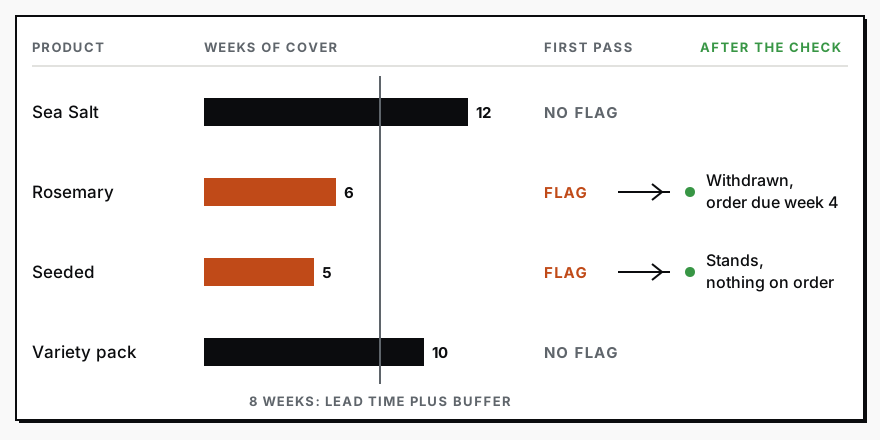
The first pass flags Rosemary and Seeded. The second pass reads the export again and finds an illustrative 1,500 units of Rosemary arriving in week 4. Counted in, Rosemary has 12 weeks of cover, so that flag is withdrawn. Seeded has nothing on order, so its flag stands. You see one flag, not two, and a reason for each decision.
The second pass is the same AI reading the same file again, so it is a recount, not an independent opinion. A recount catches arithmetic slips, a dropped row and a shipment it missed the first time. It cannot catch a wrong number in the export itself. That is why every flag shows its numbers: you can trace any one to a cell in your export, and a flag you cannot trace is a flag you ignore.
How do you check the flag before ordering?
Have the second pass do four jobs against the same export, so the check does not depend on the first pass being right.
- Recompute every weeks-of-cover figure from the raw columns and correct any that differ.
- Count the products. Each one must appear exactly once, either flagged or not flagged, so a dropped row shows up as a missing one.
- Add the units already on order and the week they land. A shipment that arrives before you run out withdraws the flag.
- Mark anything it cannot prove as "ask me": a week with no data, a product with less than a month of sales history, a flag it cannot trace to specific numbers.
A missing week is never zero sales. Zero is a number, and a missing week is an absence, and an AI that fills the gap with zero will flag a healthy product.
What should AI never decide alone?
- Whether to order and how many. Minimum order sizes and cash are yours.
- Any product with less than a month of sales history, since a new product has no pattern to divide by.
- Any product with a promotion, retailer reset or season change ahead of it.
- Any figure it cannot point to in the export.
Inventory risk should show up before it gets expensive covers why stock belongs next to revenue. When your inventory system and your sales system disagree, Your weekly meeting should not start with "which number is right?" covers settling it. The founder's CPG dashboard shows where the flags belong once they exist. If you would rather not paste an export every week, Reporting Sprint is our setup of a weekly readout that runs without you.
Turn your export into checked flags
In the older days you would open the export, add a column for average weekly sales, divide, sort by cover, look up each product's lead time, find what is already on order, and email the short list to whoever places orders. For a brand with forty products, call it about two hours every week, an illustrative figure. And two hours later you have a list in a spreadsheet nobody else can follow.
Today, give this to Claude, an AI assistant you can type to like a colleague, and you have your checked flags in about a minute. (A prompt is just the instructions you type in; you can paste this one as it is.) Copy the cells of your export from the spreadsheet and paste them under it. Change the 6 and the 2 to your own lead time and buffer in weeks. Whoever places your orders can do this in the same minute, so it does not have to be you.
You are helping the owner of a small food and beverage brand who is not technical. Use plain English, and explain any technical term in the same sentence you use it.

Below these instructions is my weekly stock and sales export, pasted as text. Read it twice. The first read is pass one and the second read is pass two.

Pass one. For every product (one row per product and size), work out weeks of cover: units on hand divided by the average units sold per week over the weeks shown. Flag every product whose weeks of cover is below its lead time plus a buffer. Use a lead time of 6 weeks and a buffer of 2 weeks for every product, unless the export gives a lead time for that product.

Pass two. Before you show me anything, check pass one against the export and correct it:
1. Recompute each weeks of cover from the raw numbers and fix any that do not match.
2. Count the products in the export. Every product must appear exactly once, either flagged or not flagged. Tell me if any is missing.
3. Add the units already on order and the week they arrive. If a shipment lands before the product runs out, withdraw the flag and say why.
4. Put any product in an "ask me" list if it has less than a month of sales history, if a week has no data, or if you cannot trace its flag to specific numbers in the export. Never guess a missing number, and never treat a missing week as zero sales.

Then show me a short list. First the flags that survived, each with units on hand, average weekly sales, weeks of cover and the numbers that prove it. Then the withdrawn flags with the reason. Then the "ask me" list. Do not tell me how much to order. Ordering is my decision.

My weekly export follows below this line.Services
Reporting SprintNobody spends their week building the report. You open it and see what is working, what is leaking, and where to push next.
CPG AI Assessment
Fix the CPG workflow that keeps landing back on your desk.
I map the recurring reporting or operating workflow first, then build only when the first useful fix is clear.