Every week, see which of your automatic Klaviyo emails leaves the most money on the table.
A free skill for Claude, Anthropic’s AI assistant: a set of instructions Claude follows. This one ranks every email in your automated Klaviyo flows, from the welcome series to the cart reminders, so nobody on your team builds the report.
For brands that sell through their own store with Klaviyo email. The skill and its setup guide arrive by email, free, with the November workshop dates. Asking also signs you up for Adding Zeroes, one email on Fridays. It runs on any paid Claude plan, Pro and up, in the account of whoever reads the report.
By requesting the files, you agree that we may email you.
What is waiting for you every week
Once it is scheduled, Claude runs the report every week in Anthropic’s cloud, with nobody’s laptop open. Schedule it in the Claude account of whoever should read it, and that person’s phone app says when the page is ready.
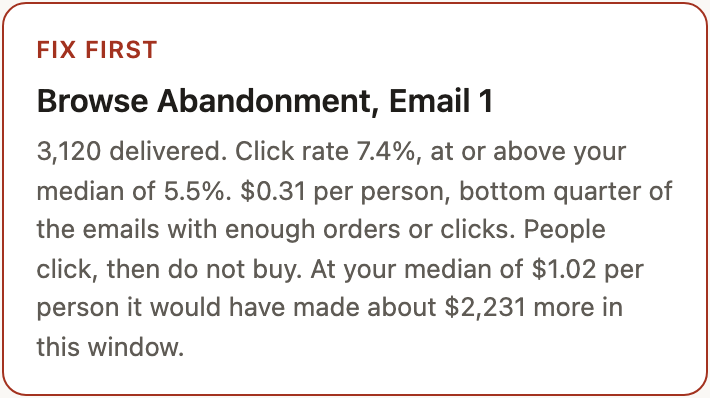
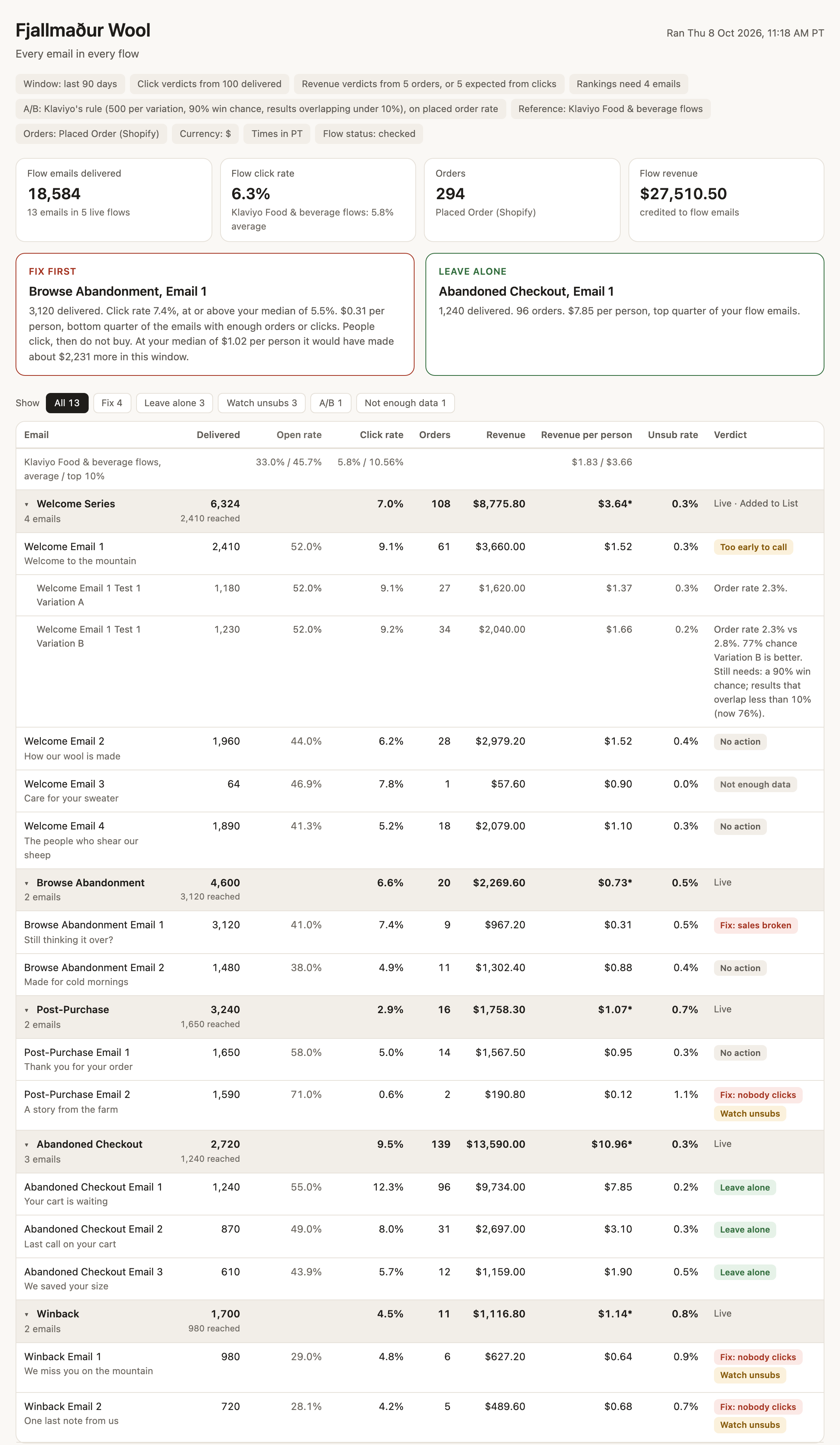
The page opens with the answer. In the report below, with the demonstration brand’s illustrative numbers, Browse Abandonment Email 1, the first email to someone who looked at a product and left, is clicked at 7.4%, above the account median of 5.5%. It makes only $0.31 for each person it reached, against a median of about $1.02.
So people click and do not buy. Had it earned the median $1.02 per person, that one email would have made an illustrative $2,231 more in 90 days. The problem sits after the click, so the fix starts with where the email sends people, not with the subject line.
A second box, Leave alone, names the email earning the most per person reached, so nobody rewrites the one that works. Below both boxes, every email in every live flow gets its own row and verdict.
How each email gets its verdict
Every email with 100 or more delivered in the window is ranked against the other flow emails in your own account. A program inside the skill decides every verdict, so the same numbers always give the same page, and the rules are printed at the foot of every report.
- Fix: nobody clicks. Few people click it. Its click rate is in the bottom quarter of your flow emails and under your median, and it earns no more per person than your median.
- Fix: sales broken. People click it and do not buy. Its click rate is at or above your median, but its revenue per person is in the bottom quarter of your flow emails.
- Leave alone. It earns the most. Its revenue per person is in the top quarter of your flow emails, with at least five orders. It takes priority over any Fix verdict.
- Watch unsubs. People leave your list after it. Its unsubscribe rate is in the top quarter of your flow emails. It can sit beside any other verdict.
- Not enough data. Too few sends to judge. Under 100 delivered in the window.
- Too early to call. A test of two versions of one email, still running. It has not yet cleared Klaviyo’s own bar for a winner, set out below.
Fix first is the flagged email with the most revenue left on the table: its sends times the gap between its revenue per person and your median.
Open rate is on the page and is never used for a verdict. Apple Mail opens emails on its own servers, so Klaviyo counts opens nobody made.
An A/B test, where Klaviyo sends two versions of one email to see which sells better, gets a winner only when it passes Klaviyo’s own bar: at least 500 people got each version, there is at least a 90% chance one version is better, and the gap between them is too big to be luck. It is judged on orders rather than clicks.
The top row of the table shows Klaviyo’s published flow benchmarks for your category, average and top 10%, for reference only.
When too few emails reach 100 delivered, the report looks back 365 days instead of 90 and says so on the page. Ask Claude to change any setting, and the report is rebuilt with it.
What it touches in your Klaviyo
The skill only reads. Klaviyo’s connector for Claude, the link that lets Claude work in your Klaviyo, can also write, including sending a campaign or deleting a flow, so the setup guide leaves every tool that can write on Needs approval. Claude asks you before it changes anything. Klaviyo lists every tool.
The skill uses four Klaviyo tools, and all four only read: account details, metrics, the flow report, and each flow email’s subject line. None of them returns a customer profile.
The report stays inside your Claude. The skill does not email it anywhere, and Nordic Navigators never sees your numbers.
Setup: about fifteen minutes, once
Setup is a job for whoever runs your Klaviyo. Forward them the email: the setup guide in it has every click.
What you need
- A paid Claude plan: Pro, Max, Team or Enterprise.
- A Klaviyo login with the Owner, Admin or Manager role, on the account your store sends orders to.
- A store connected to Klaviyo, so the report has orders to count.
Five steps
- In Claude’s settings, turn on Code execution, the switch that lets Claude run a program. The skill has one inside.
- Add the skill: under Skills in Claude, upload the smaller of the two ZIP files (compressed folders) from the email.
- Connect Klaviyo from Claude’s connector list. Set its two groups of tools that only read to Always allow, and leave everything that writes on Needs approval. The guide has every click.
- Type “Run the Klaviyo flow report.” A few minutes later the report opens as a page in any browser.
- Schedule it weekly with the same words, and press Run now once to check that it finishes on its own.
On Team or Enterprise, your Claude Owner first turns on Code execution and Skills for the organization. The setup guide has the exact settings, and a fix for each common problem.
This report is one scheduled job. Learn to build the next one.
The flow report is a checked report on a schedule: it runs every week, and your team reviews the result. The last week of the AI CPG Workshop teaches you to build that kind of job yourself. You define what goes in and what comes out, check the result, put it on a schedule, and learn to spot a run that failed.
Each week you build one thing in your own Claude account:
- November 10. A company knowledge bank: your products, customers, pricing, trade terms and brand standards, so you stop briefing AI from scratch.
- November 17. Customer reviews turned into sales copy: why customers buy and why they hesitate, read from your reviews and support replies. You get draft copy with the quotes behind it.
- November 24. A business dashboard: two sources and two comparable periods, with totals you can trace back to the source.
- December 1. A scheduled report, the kind of job this flow report is.
Then the same method goes to your own ideas: a supplier scorecard, a launch checklist, a retailer account brief.
Live online, Tuesdays at 10 AM Pacific, one hour, recorded: November 10, 17 and 24 and December 1, 2026. Office hours on Wednesdays. Join on your own, or bring colleagues from operations, sales and marketing at a team price. Enrollment closes when the first session starts. Needs a paid Claude plan.
Price, seats and the full schedule are on the workshop page.
Questions before you ask for it
What does it cost?
The skill is free. It runs on any paid Claude plan: Pro, Max, Team or Enterprise. Asking for the files also signs you up for Adding Zeroes, one email on Fridays, with one-click unsubscribe.
Do I need the workshop to use it?
No. The skill works on its own, every week, for as long as you keep the schedule. The workshop is for building the next scheduled job yourself.
Who is it for?
A brand that sends flow emails through Klaviyo, with its store connected. An email needs 100 delivered before it gets a verdict, so a small or new list sees mostly Not enough data at first.
What exactly does it read?
Your account’s name, currency, time zone and industry. The list of what Klaviyo tracks, to find orders, which Klaviyo calls Placed Order. Totals per email for the window: delivered, opens, clicks, orders, revenue and unsubscribes. The subject line of each email in a live flow.
Does it cover SMS?
No. The report reads email sends only.
Can I see what it does before I install it?
Yes. Open the ZIP from the email and read SKILL.md, a plain text file, in any text editor: those are the instructions Claude follows. The verdict rules are in scripts/build_report.py, the program inside it, for anyone who reads code.
Who built it?
I did: Smári Ásmundsson. Nordic Navigators is my company. I built the report from the flow reporting I use for NØRSE CØDE, the plant protein powder we make in our own Petaluma facility. I tested it on my own Klaviyo.
Get the weekly report
The skill and its two-page setup guide, free, by email, with the November workshop dates.
By requesting the files, you agree that we may email you.