By Smári Ásmundsson · · 6 min read
Enterprise AI agents: what a seven-figure CPG brand should copy and skip
What do enterprise AI agents offer a seven-figure CPG brand, and what should it copy at its own size?
A reorder email goes to a buyer with last quarter's price on it, or a listing goes live at the old price, and you find out when someone writes back. Nothing about that failure needs an IT department to prevent. Large companies put five controls around the AI that does jobs for them, and a seven-figure CPG brand should copy two of those now, shrink two to a smaller version and skip one until a second person runs it.
Which enterprise agent controls matter at a lean team's size?
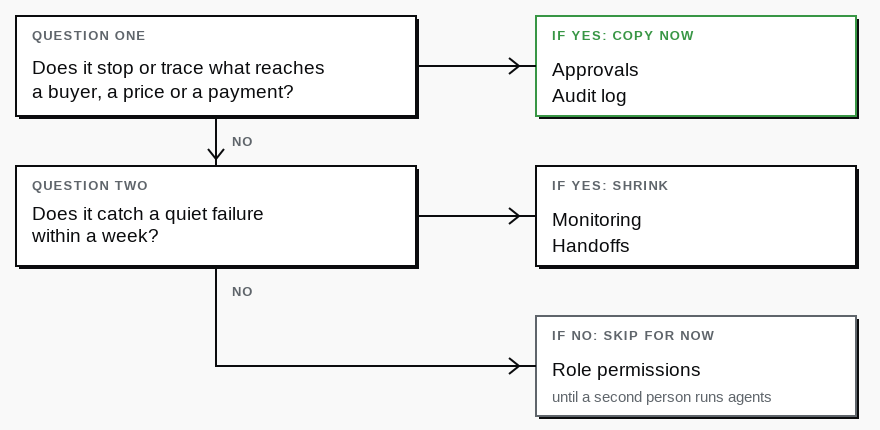
Two questions sort all five. Does the control stop or trace something that reaches a buyer, a price or a payment? If yes, copy it now. If no, does it catch a quiet failure within a week? If yes, copy a smaller version. If neither, skip it until the team is bigger.
Enterprise AI agents are AI helpers that do jobs on their own, such as drafting a reply or updating a price sheet, inside a large company's rules. An agent is the helper itself: AI that does a task without waiting for you to type each step. Which AI agents a small CPG brand should use covers how to pick one. Large companies usually wrap agents in approvals, an audit log, role permissions, monitoring and handoffs, because many people and many agents touch the same systems. Your team is small enough that one person can name every job an agent does. The same five ideas apply, in a smaller form.
Approvals: copy now. Anything an agent writes that leaves the building waits for a yes from the person who owns that relationship. A reply to a buyer, a price sheet, a deduction dispute. At your size the approval is an email to one person with the draft in it, and nothing sends until they answer. Autonomous AI agents: which CPG jobs should run without a person watching sorts jobs by how much a person watches, from AI that only suggests to AI that acts alone, and approval sits in the middle of that range.
Audit log: copy now. A log is a plain list of what the agent did and when. It lets you answer "who sent that price sheet" in a minute and undo it. One row per action in a shared spreadsheet is enough. Large companies add locks so nobody can edit the list afterward, and keep it for years. You need the list to exist and one person to read it.
Monitoring: shrink. The enterprise version is dashboards and live alerts. The lean version is one alarm: if a job that should run every day has produced nothing by 10 AM, the owner gets a message. A job that has stopped looks exactly like a job with nothing to report, so the alarm is what tells them apart. For the jobs that act on their own, the AI that audits the AI shows a second AI whose only job is to read each result and stop the bad ones before they go out.
Handoffs: shrink. In a large company a handoff routes a case from an agent to a person or a team, with the history attached. The lean version is one named owner per job. When the agent is unsure, it sends that person three lines: what it saw, what it did not do, what it needs from them.
Role permissions: skip. Large companies decide which role can see and change what. While everyone who runs an agent can see the same things, a grid of who may see what is overhead. Skip the grid and keep one habit: each agent logs in with its own account, never yours. You can switch it off without locking yourself out, and the log shows which one acted.
What does an approval step look like without a platform team?
Take an example brand selling frozen meals to regional grocers, with an agent that drafts replies to buyer emails. Every draft arrives in Dana's inbox, she handles accounts, with the buyer's message underneath. She answers "send" or edits it, and the draft goes out only after her answer. A draft takes her about 90 seconds. Twelve drafts a week is 18 minutes of her time, and no price reaches a buyer without her having read it. That is the whole system, and it needs no software beyond the email she already uses.
When does a brand outgrow its first agent setup?
Three signs. A second person starts running agents, and the skipped role permissions move to copy now, because you need to know who changed what. A job moves from drafting to acting alone, and the one alarm becomes a check on each result, not only on whether the job ran. Drafts waiting for approval pile up for more than a day, which means one owner has become the bottleneck, and approvals should split by who owns which buyer.
How do you check your own setup against these controls?
In the older days you would sit down with your ops lead and go through every job an agent or an automation touches, asking of each: who approves it, where is it written down, who is told when it stops, who gets the question when it is unsure. Half a day, and the answers go stale the next time someone adds a job.
Today, whoever runs operations pastes the instructions below into Claude, an AI chat assistant, with a plain description of each job, and the gap list comes back in about a minute. Your part is reading it and choosing which gap to close first. (The instructions are the words you type in. Paste them as they are, then add your jobs underneath.) What comes back looks like this:
| Job | What is in place | Gap to close first |
|---|---|---|
| Drafts replies to buyers | Dana approves, spreadsheet log | Alarm if no drafts by 10 AM |
| Updates the retailer price sheet | Nothing | Approval before anything is sent |
| Sorts support emails | Daily list, Sam owns it | Alarm if the list is empty |
Below I list the jobs my AI helpers do in my CPG brand. For each job, check four things from what I wrote: does a named person approve anything that reaches a buyer, a price or a payment; is there a written list of what it did and when; would anyone be told within a day if it stopped; is there one named owner it sends questions to.

Answer as a table with one row per job and these columns: job, what is in place, gap to close first. Write "not needed" only for a job that touches nothing outside the company and can be undone. Where my description is too thin to tell, write "unknown" and say what I should add. Do not suggest software to buy. Keep each cell under twelve words.

My jobs:
If a gap is an approval, a log and an alarm around a job that already runs, Workflow Build is where Nordic Navigators builds one recurring job with those checks in place.
Services
Workflow BuildYou stop doing the job that keeps coming back, and it stops being the thing that slips when the week gets busy. Those hours go back into the work that actually grows the brand.
CPG AI Assessment
Fix the CPG workflow that keeps landing back on your desk.
I map the recurring reporting or operating workflow first, then build only when the first useful fix is clear.