By Smári Ásmundsson · · 6 min read
Which Klaviyo flow email to fix first, every week
Klaviyo will not show you every flow email on one page, so most brands stop looking. One line in Claude now puts a verdict on every email in every flow each week and names the one to fix first.
If someone else runs your Klaviyo, forward this to them. Your automatic emails go to every person who signs up or leaves a cart, every day, and in many brands nobody has looked at them since the week they were built. That is true even if direct sales are a small part of your business.
This post is a free tool that fixes that. Every week it puts a verdict on every one of those emails and names the one to fix first. Whoever runs your Klaviyo sets it up once, in about fifteen minutes.
Klaviyo calls these emails flows: the welcome series, abandoned checkout, browse abandonment, post-purchase and winback emails that go out on their own when someone signs up, leaves a cart, looks at a product and leaves, places an order, or goes quiet for a few months. Many brands build them once and leave them alone, because finding out how each email is doing is slow, dull work.
Klaviyo will not show you every flow email on one page. To see how one email performs, you open the flow, click into the email, read its numbers, click back out and open the next one. Then you copy them into a sheet so you can see which emails are weak next to the others, and you try to work out whether the A/B test on the first welcome email, where Klaviyo sends two versions to see which does better, has a real winner or just had a lucky week. For five flows that is most of an afternoon. A month later the numbers have moved and the afternoon starts again.
I mostly ignored my own flows at NØRSE CØDE for exactly that reason. Getting the numbers took forever, and I had to do it again every time I wanted them.
On October 8 I built it live on a Startup CPG webinar. You can run it on your own Klaviyo this week.
One line, once a week
The report runs in Claude, an AI chat assistant like ChatGPT. Once it is set up, you type one line. (A prompt is just the instructions you type in, and this one is the whole prompt.)
Run the Klaviyo flow report.A few minutes later you have one page. It shows four totals across the top, then a Fix first box and a Leave alone box. Below them is every email in every live flow, with its delivered count, open rate, click rate, orders, revenue, revenue per person and unsubscribe rate, and a verdict on each row. Flows that are switched off sit at the bottom with no verdict, so nothing you have retired gets judged.
The verdicts come from a short list, and each one has its rule printed on the page. In plain words:
- Not enough data. Under 100 delivered in the window. No verdict yet.
- Fix: nobody clicks. In your bottom quarter for clicks.
- Fix: sales broken. Clicks are normal, but money made per person is in your bottom quarter.
- Leave alone. In your top quarter for money made per person.
- Watch unsubs. In your top quarter for unsubscribes. It shows up beside any of the others.
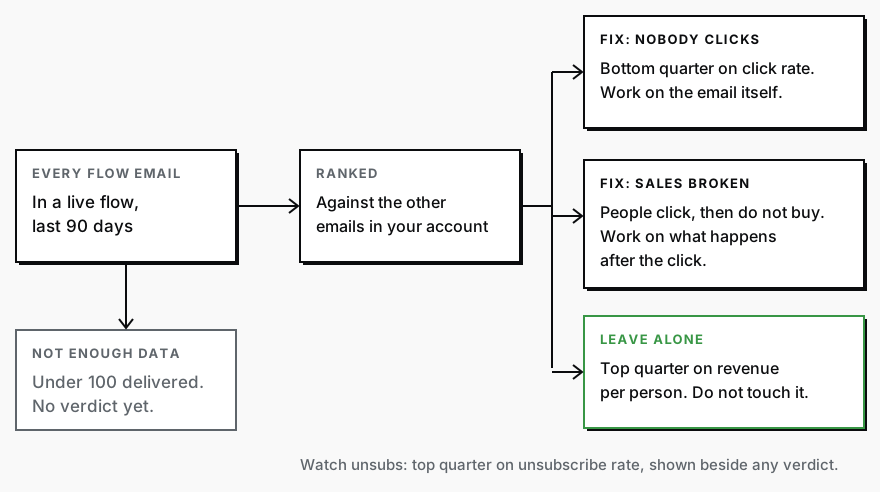
The two Fix verdicts point at different problems. "Nobody clicks" means the email is not earning the click, so the email itself is where you work. "Sales broken" means people click and then do not buy. That email has done its job, and the money is being lost after the click, on the page it sends people to or in the offer they find there.
The Fix first box picks one email out of everything flagged: the one that would make the most extra money if it did as well per person as your typical email. On the call I ran it on a made-up wool brand, with invented numbers. Its Fix first was the first browse abandonment email. It was delivered 3,120 times and got clicked more than the typical email, but it made $0.31 per person, against $1.02 for the typical email. At $1.02, the page said, it would have made about $2,200 more in that window.
Judged against your own emails
Every email is ranked against the other emails in your own account, so your welcome email is up against your abandoned checkout email. An industry average does not decide anything. Klaviyo's published benchmark for your category still sits next to each number, the average and the top 10%, so you can see where you stand. The category comes from your Klaviyo account settings.
A small program inside the tool decides every verdict, which means the same numbers always get the same verdict. Claude pulls the numbers and builds the page, and makes no judgment calls on it. If a verdict changes from one week to the next and you did not touch that email, something around it changed. Maybe the store stopped sending orders to Klaviyo, or someone edited the flow the email sits in. Either way, you know where to look.
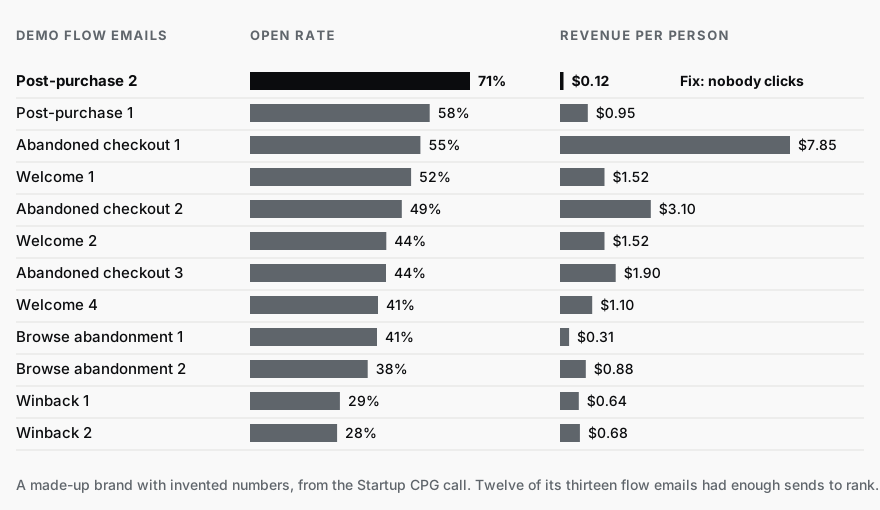
Open rate is on the page because people expect to see it. It decides nothing. Apple Mail opens emails on its own servers before anyone reads them, so opens get counted that nobody made. On the demo page, the email with the highest open rate was the worst on the page at getting a click:
A/B tests get the same treatment. The report calls a winner only when the test clears the bar from Klaviyo's own help article: at least 500 people got each version, there is at least a 90% chance one version is better, and the two results barely overlap. It judges the test on orders placed, because orders are the point. Klaviyo's own test screen judges on click rate unless you change it. On the made-up demo brand, version B of the first welcome email had a 77% chance of being better. The report said too early to call, and listed what the test still needed.
It tells you where. You still find out why.
My own flow reporting kept putting our second welcome email at the top for unsubscribes. The obvious suspect was the copy, and a rewrite was already drafted. The copy was not the problem. The sign-up form promised a discount code, and none of the welcome emails carried it. People joined for the code, never got it, and left on day two. The code went into the first email and the hard sell came out of the second.
The report did not find the missing code. It kept pointing at the same email until we put the sign-up form and the emails side by side.
On the call, someone asked whether Claude also writes the better email. Sometimes. Claude is very good at anything with a clear right answer, like this report. Writing in your voice takes a lot more work to get right. So the tool does not rewrite anything. It reads your account and tells you which email to open.
Setting it up, for whoever runs your Klaviyo
Whoever runs your Klaviyo sets it up once, in about fifteen minutes. The weekly schedule needs a paid Claude plan. The setup guide in the download walks them through every click.
After that a scheduled task runs the report every week in Anthropic's cloud, with the laptop closed, and the page is waiting in Claude when you open it. Nobody has to remember to run it.
The report only reads your Klaviyo, and the guide sets Claude to ask you before it creates or changes anything there.
Download the Klaviyo flow report
Inside are the skill (the instructions Claude follows to build the page) and the setup guide.
What to do with the page
Fix the one email in the Fix first box. Only that one. Let the next few weekly pages show whether it moved, then fix the next one.
Services
The AI CPG WorkshopThe AI CPG Workshop: four live weeks with founder Smári Ásmundsson to build your company second brain, commercial workflows, dashboard and automation.
CPG AI Assessment
Fix the CPG workflow that keeps landing back on your desk.
I map the recurring reporting or operating workflow first, then build only when the first useful fix is clear.