By Smári Ásmundsson · · 9 min read
Lindy AI Agents: What a CPG Founder Should Check Before Trusting One
What do Lindy AI agents do well, and where should a CPG founder add a check before trusting one?
Picture a 6 AM digest of wholesale orders that says "no new orders overnight." It says that on the morning the login to your inbox lapsed, or the login to a distributor's ordering portal. The AI read nothing, and a summary of nothing is still a summary.
That is the main thing to check about Lindy AI agents. An AI agent is software that takes a task and does the steps itself. Lindy's agents are built for work that ends in a draft, a summary or a report, and they report success in their own words. So the check has to sit outside the agent. At the end of every run it goes and looks at the actual result, in the inbox, the spreadsheet or the order list, and writes one line saying what it found. That is a proof line, for example: "Expected 14 orders, found 14, latest is order 4471" (an illustrative line). A second job messages you when that line does not arrive.
I read Lindy's public site, its pricing page and its documentation on October 23, 2026. This is a teardown of what Lindy publishes, not a test of the product. Where I say what could go wrong, I say I have not tested it, and I tell you how to test it on the free trial.
What kinds of jobs is this product built for?
Lindy describes itself as an AI employee. Its documentation says it acts as a personal assistant for you, and as a shared teammate when you mention it in a channel of Slack, the team chat app. The jobs it lists are the paperwork around a business: inbox and calendar, meeting notes and follow-ups, reports, and updates to your customer list. Its pricing page names use cases such as "Log invoices", "Monitor ad spend" and "Month-end chase".
The unit of work is a routine, which is a job that runs on a schedule or when something happens. The documentation says each routine has three parts: when it runs, what to do in plain English, and where the result goes.
On price, the Team plan on Lindy's pricing page starts at $49.99 a month for 5,000 credits, and the free plan gives $50 in credits that last 7 days. A credit is a unit of work, and the usage page in its documentation puts one at $0.01 on base plans, drawn from one balance your whole team shares.
For a seven-figure CPG company, that fits jobs where a person reads something, decides nothing and writes it up: a morning brief, a reply to a distributor, a weekly summary of ad spend. It is a poor fit for any job whose output is a number someone else will rely on without looking, until you have added the check below.
Where can an agent report done when the job failed?
Lindy's home page shows a demo of the agent answering "reconcile Stripe vs. the gsheet ledger for the close." Stripe is the card payment service, and the ledger is a Google spreadsheet. The reply lists three steps with a checkmark each: it pulled 1,284 charges and 96 refunds, matched them to the ledger, and wrote up 4 exceptions. It finishes with "3 steps · done in 34s" and "Done, caught only 4 anomalies, none blocking!"
That is a demo, and a good one. It is also the shape every job of yours will report in: the agent describing its own steps. Nothing on that screen is read back from the ledger afterwards. Here are three places a CPG job can say done while failing behind that shape.
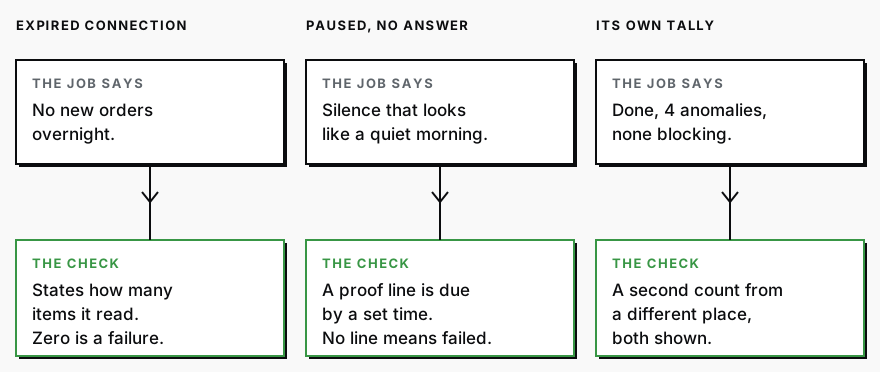
The connection expired and the agent read nothing. Lindy's documentation says each connection shows as healthy, needing a reconnect (usually an expired login key) or not set up. That status sits on a settings page, not in the routine's output. A job that reads zero items can truthfully summarize zero items. I have not tested what Lindy reports in that case. Test it: disconnect the account on purpose during the free trial and see what the routine says. The check is a count. The job states how many items it read, and zero counts as a failure unless you told it zero is normal.
The job paused and the question went to nobody. The usage page says Lindy pauses a task that is using far more of the shared balance than usual, then asks you to continue or stop in the Slack thread or message where you asked. A routine that fires at 6 AM has no one answering. A paused job is not a finished job, and a morning with no output looks the same as a quiet morning. The usage page also says monthly credits reset each cycle and do not roll over, so find out what your routines do when the balance is empty. The check is a deadline. The job must leave a proof line by a set time, and no line by that time means it failed.
The agent's own tally is the only tally. In the reconcile demo, the 1,284 charges and the 4 exceptions are the agent's own counts. If it dropped a page of results, the report would still read cleanly. The check is a second count taken from a different place than the one the agent used. If it reports 212 orders in a weekly summary (an illustrative number), the order count in your store's admin for the same week should say 212 too, and both numbers appear in the report.
What is the one check that covers all three?
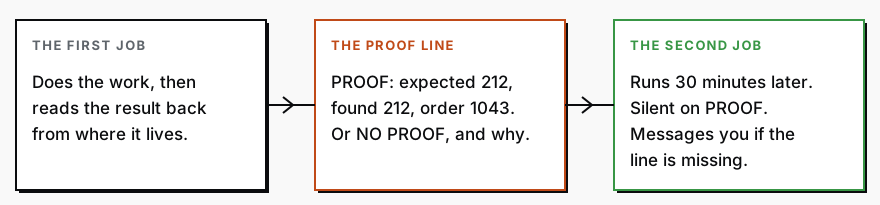
Make the agent prove its work happened, and make a second job notice when the proof is missing. The first job ends every run by looking at the actual result in the place it lives, then writes one line: PROOF or NO PROOF, how many items it expected, how many it found, and one real item by name or number. The second job runs a set time later, looks for today's line, and messages you only if the line is missing or says NO PROOF.
In the older days you would build this by hand. For every job, write down what it should have touched, open each of those places every morning, count what is there, and compare it to what the job said. Across every job you run this way, that is a recurring morning of your week, and it is the first thing to slip when the week gets busy.
Today, give this to an AI chatbot (a program you type to, such as Claude or ChatGPT) and you have the check written in about thirty seconds. The text you type to an AI is called a prompt, and you can paste this one as it is. It is a one-time job for whoever sets up your software, an ops manager or a contractor. They paste it in, add the instruction your agent already has under the last line, and set up the second job it writes. After that, the only thing you read is the weekly note below. If nobody on your team does that, it is the kind of work the Workflow Build covers.
I run a food and beverage brand. Below is the instruction I gave an AI helper that runs by itself on a schedule.

Do two things.

1. Rewrite my instruction so the helper ends every run by reading its own result back from the place the result lives (the inbox, the spreadsheet, the order list, whatever the job touches), not from its memory of what it just did. Then it writes one line that starts with PROOF or NO PROOF. A PROOF line says how many items it expected to find, how many it actually found, and the name or number of one real item. If it read zero items, or the numbers do not match, the line starts with NO PROOF and says why. Wherever the helper reports a total, it also gives a second count taken from a different place than the one it used, and shows both. Keep my original instruction word for word and add to it.

2. Write a second instruction for a separate scheduled job that runs 30 minutes after the first one. It looks for today's PROOF line. If the line is missing or starts with NO PROOF, it messages me with the name of the job and the reason. If the line starts with PROOF, it stays silent.

Use plain words.

My helper's instruction is pasted below this line.
The same rule runs through my own work: a job is done when it leaves something I can look at, not when it says so. I wrote about a system that passed 121 automated tests on the night it shipped junk in Green tests measure the wrong thing. The second job above is the idea in The AI that audits the AI: the part that writes and the part that checks are never the same part.
What should a human still review each week?
Not the work. The proof. Have the second job send one note at the end of the week that lists every NO PROOF and every missing line, and read that note. A week with none is a result. A week with three is a conversation about which job to fix or retire. Treat AI like a hire, not a tool covers the rest of that conversation: the job, the manager, the probation and the off-ramp.
One decision stays yours: the approval setting on each connected tool. Lindy calls these guardrails. The documentation lists three settings, Always allow, Require approval and Don't offer, and says they cover writes, meaning changes to your tools, and never reads. It also says they apply in shared Slack threads only. A request you text from your phone is not guarded, so it goes out with no approval step. Decide, tool by tool, whether that is what you want.
Email is the safer case. The documentation says drafted replies and follow-up reminders land in your drafts folder and nothing goes out without your approval. That protects you from a bad send. It also means "drafted 12 replies" has no recipient until someone opens the folder, so the proof line should count the drafts still waiting and the age of the oldest.
When is a different setup the better choice?
Three cases.
If the output is a number a retailer, a lender or an auditor will rely on, let the system that holds the data produce it. Your store, your marketplace account or your accounting software already has a report for it. Have the AI read that report and explain it, rather than rebuild the figure from raw rows the way the reconcile demo does.
If the job runs once a quarter, a scheduled agent is more machinery than it deserves. Run it by hand in a chat, with the prompt above adapted to it, and keep the instruction for next quarter.
If you already do your analysis in one AI tool, a second tool is a second place to check. Use Lindy for the jobs it is built for, such as inbox and meeting follow-up, and keep the analysis where it is.
Services
Workflow BuildYou stop doing the job that keeps coming back, and it stops being the thing that slips when the week gets busy. Those hours go back into the work that actually grows the brand.
CPG AI Assessment
Fix the CPG workflow that keeps landing back on your desk.
I map the recurring reporting or operating workflow first, then build only when the first useful fix is clear.