By Smári Ásmundsson · · 5 min read
What an AI automation consultant should prove before go-live
What should an ai automation consultant prove to a CPG founder before the first automated job goes live?
The Friday report did not arrive, and nobody told you. You found out Tuesday, when a broker asked about a number you had never seen, and the consultant's status page still showed a green light.
Before an AI automation consultant switches on your first automated job, they should prove four things in writing: what output shows the job ran, what a failure report will say, who reads it every day, and what check runs on a bad day. If any of the four is missing, you have bought a demo.
Why does a green light prove so little?
I have been on the wrong side of this. A system I built passed 121 automated tests on the night it shipped and produced junk content. Every test asked whether the machinery ran. None asked whether the output was any good. I wrote that up in Green tests measure the wrong thing.
A job here is one chore the AI does on a schedule, such as building the Friday report. Go-live is the day it starts running for real. A status light is the consultant telling you the job finished. Proof is something you can open yourself. The four items below turn the first into the second, and none of them needs another client's work to show you. The proof is your own job, running on your own files, before go-live.
What output proves an automated job really ran?
A dated thing you can open. A file with this week's date in the name, a row in a sheet, an email in your inbox with the week's range in the subject line. Then one number that should never be zero, printed in the output itself: rows read from the export, orders counted, invoices matched.
That number matters because a job can run perfectly on an empty file. It finishes, it turns green, and it tells you nothing. A report that says it read 1,240 rows (an invented figure, for illustration) can be checked against the export. A report that says "complete" cannot.
What should a failure report contain?
Five things, in plain sentences: the job's name, the step that failed, what it expected and what it found, the date of the last good output, and what was not sent because of it.
Here is the shape: "Friday sales summary. Step 2 failed. Expected seven days of distributor data, found four. No report was sent. The last good report is from November 6." A message that says "error 500" gets ignored by week three. A message that says what is missing and what is still safe gets read.
Who reads the checks after go-live?
One named role, with a cover, at a set time of day. Not "the team". When I wrote about treating AI like a hire, the second requirement after a clear job was one person who owns its output and reads it. The same applies to a consultant's build.
In a small company that is usually whoever runs operations, reading the check by 9:00 AM Pacific. You hear about it only when it needs a decision. If you are the reader, the job has moved the work onto you rather than off it.
What should the founder see on the first bad day?
A bad day will come. An export changes a column name, a login expires, a distributor sends the file late. The first bad day is the one that tells you whether the build works.
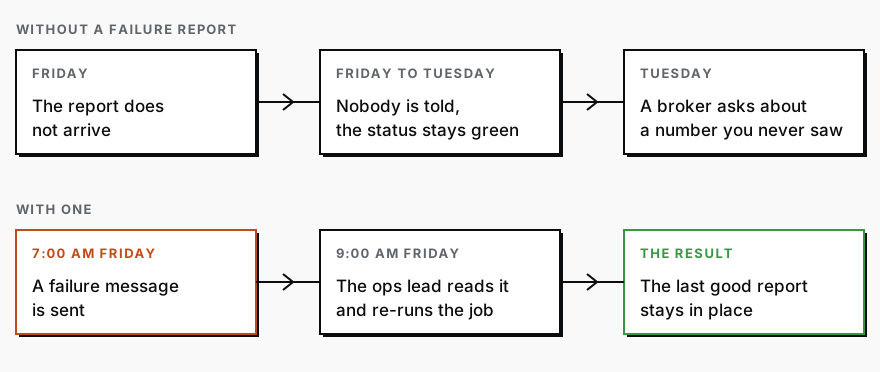
What you should see is one message, before you notice anything wrong, saying what broke, what was not sent, and that the last good output is still in place. The consultant should rehearse it before go-live. They feed the job a bad file on purpose, such as an export with a renamed column, and show you the message that comes back. If they will not break their own job in front of you, the first bad day will be yours.
I wrote in The AI that audits the AI about a second system whose only job is to have an opinion about the first one's work and the authority to block it. The bad-day check is the smallest version of that.
How do you get all four on one page?
In the older days you would sit with the consultant for an afternoon, go job by job, argue about what "done" means, and write it up by hand. Say three hours for one job and a day for five, and then someone has to keep it current.
Today it takes a few minutes, most of them spent typing two sentences about the job. Whoever pulls your distributor export, not you, opens Claude, the AI chat tool, and pastes the instructions below with those sentences under them. Claude sends back a scorecard like this one:
| Question | Answer for the Friday sales summary |
|---|---|
| What proves it ran? | An email by 7:00 AM Pacific every Friday, with the export's date range and rows read (1,240 in the example) |
| What must a failure report show? | Job name, failed step, expected against found, last good report date, what was not sent |
| Who reads it? | The ops lead by 9:00 AM Pacific, with the bookkeeper as cover. You only hear if it says "needs a decision" |
| What is the bad-day check? | Before go-live, the consultant feeds the job an export with a renamed column and shows you the failure message |
| Go-live is blocked until | All four have been shown working on your own files |
Here are the instructions to paste:
I am going to describe one job that an AI will run for my company on a schedule. Turn my description into an acceptance scorecard, as a table, with one row for each of these: the output that proves the job ran, including one number that should never be zero; what a failure message must say, in plain sentences; the one named role that reads the checks each day and who covers when they are out; and a bad-day test the consultant must run before go-live, with the message I should see. Then list, as questions, anything you could not fill in from my description. My job is described below.Claude can fill a row wrongly, as any assistant can, so treat the table as a draft. Your part is reading it against your own export and what you know of the business, and saying yes or no to each row. Then send it to the consultant before the build starts, so that go-live is something they agree to meet rather than something they decide.
If you want the first job built to a scorecard like this one, the Workflow Build is one recurring job, running in your own accounts, that you own.
Services
Workflow BuildYou stop doing the job that keeps coming back, and it stops being the thing that slips when the week gets busy. Those hours go back into the work that actually grows the brand.
CPG AI Assessment
Fix the CPG workflow that keeps landing back on your desk.
I map the recurring reporting or operating workflow first, then build only when the first useful fix is clear.