October 2, 2026 · 10 min read
Support replies that learn from what your team sends
Your team answers the same questions every week, a little differently each time. Three prompts have AI draft every reply and rewrite its own library from the edits your team makes.
One seat left at $750.
The AI CPG Workshop starts Monday, October 12. It runs four Mondays at 10 AM PT, one live hour each, with office hours every Wednesday. Each week you build one thing for your own business, inside your own Claude account: one place that holds your products, customers and terms so AI can read them, a set of instructions that turns your reviews into sales copy, one dashboard for your numbers, and a job that runs on a schedule without you starting it. You also come away knowing how to build the fifth one yourself.
After that seat goes, the price is $950.
Every CPG brand answers the same questions over and over. Shoppers want to know whether it is gluten free, where their order is, what to do about a seal that arrived broken, and whether they can take it while pregnant. Distributors and buyers want the spec sheet, the case pack, the lead time and the minimums. Each one takes a couple of minutes, and somebody on your team answers it from memory, a little differently from the last person who did.
Three hundred of those emails a month at three minutes each is fifteen hours, nearly all of it spent writing answers that already exist somewhere in your Sent folder. The bigger cost is drift. One person tells a customer it ships in two days and another says three to five. A damaged bag gets a replacement from one teammate and a refund from the next. Neither is wrong, exactly, but a customer who gets both answers in the same month has learned that your policy depends on who reads the email.
The old fix, and why it went stale
In the older days the fix was a set of canned replies. Somebody gave up a day, read back through a few months of sent emails, wrote thirty standard answers and loaded them into the help desk. For a month or so the answers were right and everyone used them. Then shipping times changed, a new flavor launched, a supplier changed the allergen statement, and nobody went back to update the canned replies, because updating them was nobody's job. The team noticed the answers were out of date, stopped trusting them and went back to typing from memory.
Every correction your team made after that day lived in one person's sent email and went no further, and keeping those corrections is the part AI can now take over.
Have AI write the library, then keep it current
Today Claude, an AI chat assistant like ChatGPT, can do both halves. It writes the library from the replies your team has already sent and drafts every new reply from it. Once a week it reads what your team actually sent and updates the library to match, so an edit somebody makes to a draft before sending it becomes the way the next draft is written.
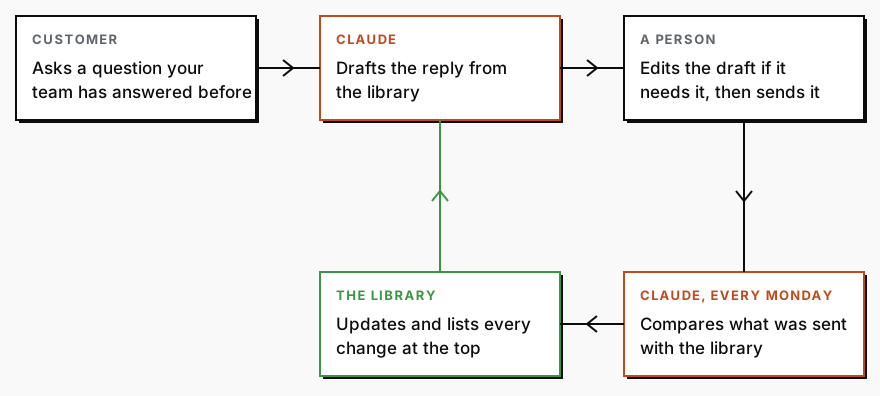
You set up three things once. A Claude Project is a workspace that keeps the same files and instructions in front of Claude in every chat inside it. Claude's connection to Gmail lets it search and read your inbox and write drafts there; it asks before it sends anything, and the instructions below tell it never to. The library itself is a Google Doc, and once that doc is added to the Project, Claude reads the newest version every time, so a change made on Monday is in Tuesday's drafts.
To switch the connections on, click the plus sign under the chat box, hover over Connectors, and turn on Gmail, Google Drive and Google Docs. Connect the Google account that receives your support email. On a Claude Team plan, the account owner has to allow connectors before anyone can turn them on. The three steps below work on any Claude plan, and the Monday schedule at the end needs a paid one, which starts with Pro at $20 a month.
Step one: write the library from what you already sent
This is the first prompt. A prompt is just the instructions you type in, and you can paste this one as it is into a new chat inside the Project.
I run a [type of brand] brand. Search my Gmail for the customer support emails from the last 60 days, and the replies we sent to them. If our support emails have their own label or address, use that.

Group the customer emails by the question the customer is actually asking, not by the words they used. "Where is my order", "has this shipped" and "the tracking hasn't moved" are one question.

Rank the groups by how many emails asked each one. For each group, give me:
1. The question in one line, in the customer's words.
2. How many emails asked it.
3. One real example, quoted.
4. The best reply we actually sent, quoted, and a standard reply written from it in the same voice.
5. Every fact that reply depends on, such as a shipping time, a return window or an ingredient, listed separately so I can check each one.

Only use facts that appear in replies we actually sent. Where two of our replies disagree, for example on shipping times, do not choose between them. List every disagreement at the top so I can decide.

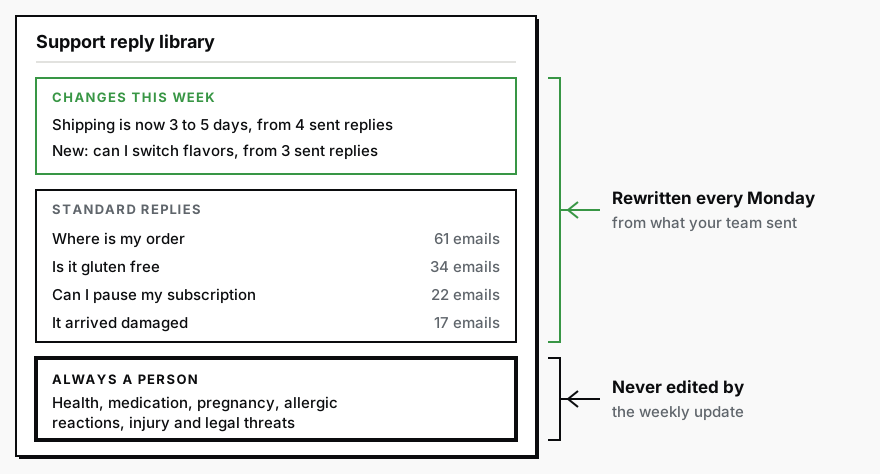
Put every question about health, medication, pregnancy, allergic reactions, injury or legal threats in a separate group called "Always a person", with no standard reply.

Write the result as a Google Doc called "Support reply library". If you cannot create the doc, give me the whole library here so I can paste it into one.
When it finishes, add the doc to the Project's files. Claude only lets you add a Google Drive file to a private Project, so keep this one private. Then read two parts of it before anything else: the disagreements at the top and the facts under each reply. That is about ten minutes of reading, and it is the only part of the setup that needs you. Every draft from here on rests on those facts, and each disagreement is a customer who was told one thing while another customer was told something else.
Step two: the instructions every draft follows
Paste this into the Project's instructions, the box that applies to every chat in it.
You draft replies to our customer support emails. Our reply library is the Google Doc "Support reply library" in this project. Use it for every reply.

When I ask for today's drafts, search my Gmail for support emails from the last day that have no reply yet. For each one:
1. Find the library entry it matches and write the reply from that entry, in the same voice, answering only what the customer asked.
2. If it falls under "Always a person", do not draft anything. List it for me at the top instead.
3. If nothing in the library matches, do not guess. Write "Not in the library" and the customer's question in one line.
4. Save each reply as a Gmail draft on the customer's email. If you cannot save drafts, show me the replies here instead.

Never send anything. Never offer a refund, a discount or a replacement unless the library entry says we offer it. Never state a fact that is not in the library.
From then on the daily job is one line in a new chat in the Project: "Draft today's replies." Whoever handles support opens the Gmail drafts, changes anything that needs changing, and sends. The emails listed at the top go to a person, the way they always have.
Step three: the part that learns
The library improves from the edits. When somebody changes a draft before sending it, the version that went out is a correction, and until now that correction lived in one sent email and nowhere else. The third prompt collects them. Run it once a week, in a new chat inside the Project.
I run a version of this on my own email at NØRSE CØDE. Every Monday, a job compares the past week's drafts across six inboxes with what I actually sent, finds the edits I keep making, and proposes a change to the drafting rules. Mine proposes and waits for me to approve. The prompt below makes the change itself and lists it at the top of the doc. Two things keep that safe: a change needs at least two sent replies that agree, and every Monday you read each change with the old wording next to the new, so a mistake two teammates both made still reaches you before it settles in.
Read my Google Doc called "Support reply library". Then search my Gmail for every support reply we sent in the last 7 days.

For each reply we sent, find the library entry it answers and compare the two. Look for three things:
1. A fact that has changed, such as a shipping time, a return window or a product.
2. A change the team keeps making the same way, such as always adding the tracking link or always cutting the second paragraph.
3. A question that was "Not in the library" and has since been answered by a person, the same way, at least twice.

Then update the library. Change a fact only if at least two replies we sent agree on the new version. If only one does, list it under "Check this" and leave the library as it is. Add a new entry only from at least two matching replies. Never change, add to or remove anything in "Always a person".

At the top of the doc, add a dated section called "Changes this week". List every change you made, with the old wording, the new wording and the sent emails that caused it. If nothing needed changing, say so in one line. If you cannot edit the doc, give me the full updated library here with the list of changes above it.
Your part is reading "Changes this week" on Monday morning, which takes a couple of minutes. If one of the changes is wrong, Google Docs keeps every earlier version under File, then Version history, and you can put the old one back.
Where it goes wrong
The rules in the third prompt exist because a library that learns can learn the wrong lesson. If one person refunds a customer outside your policy, that is one email, and one email never changes the library. It lands under "Check this", where you see it. The health, allergy and legal questions sit outside the learning altogether, because a confident wrong answer there costs far more than a wrong shipping estimate.
The library only learns about a change after somebody has answered a customer with it by hand, twice. When you already know something changed, such as a price, a new flavor or a slower carrier, tell it directly. Open a chat in the Project and write "Shipping is now 3 to 5 days. Update the library and add it to this week's changes."
If your support runs through a help desk rather than Gmail, the Gmail connection does not reach it. Look for your help desk under Connectors in Claude. If it is there, connect it and put its name in place of Gmail in all three prompts. If it is not, most help desks can export tickets as a file, and you can attach the last 60 days to the first prompt instead. The catch is that the Monday step then needs somebody to attach that week's export, which is the one manual job left in the setup.
If your inbox gets a handful of support emails a week, the Monday update will usually report that nothing changed. That is the right answer, and the drafting still saves the typing.
For the wholesale inbox, run the first prompt with "emails from distributors, brokers and buyers" in place of "customer support emails", and keep the result as a second doc. A buyer needs different facts from a shopper, and one library holding both answers each of them worse.
Run it without remembering to
The third prompt is a Monday morning job, and it only works if it runs every Monday. Claude can run it for you as a scheduled task, which is available on the paid plans. In Claude, paste the third prompt with one line above it: "Run this every Monday at 6 AM Pacific." It runs even when your computer is asleep, and the changes are waiting at the top of the doc when you open it. The daily drafts can run the same way: paste the instructions from step two with "Every weekday at 6 AM Pacific, draft today's replies" above them, and the drafts are in Gmail before anyone opens it.
Run the first prompt today, even if you go no further. The list of places your own replies disagree is the list of customers who were told two different things.
The full guide
What AI actually does inside a CPG operation, and what it costsThe three kinds of work worth pointing AI at, what each one costs to build, and the work I will tell you to leave alone at your size.
CPG AI Assessment
Fix the CPG workflow that keeps landing back on your desk.
I map the recurring reporting or operating workflow first, then build only when the first useful fix is clear.