By Smári Ásmundsson · · 8 min read
ChatGPT prompts for business: the five a CPG founder should save
Which chatgpt prompts for business are worth saving for a CPG founder?
Open ChatGPT cold and ask it to write to a buyer, and it can invent your payment terms and sound sure about it. Five sets of instructions are worth saving: one that teaches ChatGPT your business, and four that do the first draft of a job you repeat every week.
The instructions you type into ChatGPT or Claude are called prompts, and you can paste every one below as printed. Here, the chat means the window where you type and it answers.
You do not have to be the one at the keyboard. The first prompt takes about twenty minutes of your answers, because only you know the business. After that, whoever runs your weekly numbers, your buyer emails and your supplier follow-ups can run the other four.
Why does a prompt need your business context first?
Context means the plain facts about your business: what you sell, who buys it, how you price it, what you never promise a retailer. A chat has none of that when you open it. When it is missing a fact it fills the gap with a plausible guess, and a plausible guess about a retailer's payment terms is worse than a blank.
So the first prompt to save is the one that gets the facts out of your head and onto one page. In the older days you would sit down and write that page yourself, which is a dull hour you keep postponing, so nobody ever has one. Today you let the chat interview you. If you want the longer version of why this page matters, teaching AI your business goes through it.
Here is what it hands back, shortened, with invented details.
What we sell and to whom. Shelf-stable snacks, sold to natural grocers and online. Trade terms. Net 30 with distributors. To confirm: terms with the two regional chains. What we never say. No health claims in labels or emails.
Paste this as printed and answer its questions one at a time.
Interview me to build a one-page briefing about my consumer products brand. Ask one question at a time and wait for my answer. Cover, in this order: what we sell and to whom, the channels we sell through, how we price and what trade terms look like, who our key retailers and suppliers are, how we want to sound in writing, and what we never say or promise. Skip anything I tell you to skip. When I type DONE, write the briefing in plain sentences, under 400 words, with a heading for each topic. Mark anything I was unsure of as "to confirm".Read the "to confirm" lines first, because those are the facts you were unsure of. Save the briefing in a document you can find in ten seconds. You will paste it above every prompt that follows.
How do you keep a prompt reusable?
A reusable prompt has three layers, and only one of them changes.
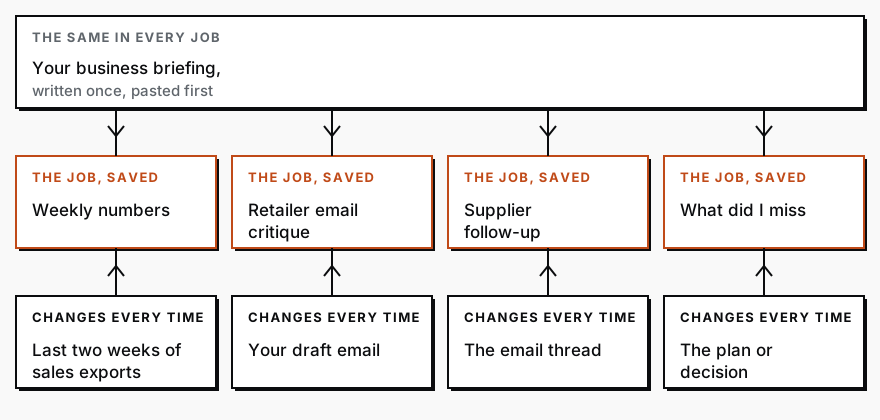
The briefing goes first and never changes. The job goes in the middle, worded once and saved. The thing that changes, this week's sales file or this morning's draft, is attached or pasted underneath, never typed into the saved wording. If you edit the saved wording every time you use it, you do not have a saved prompt, you have a draft. Give each one a plain name, such as "Weekly numbers", so you find it in the document without reading it. Once more than one person uses them, a one-page AI playbook keeps everyone using them the same way.
One more habit makes them last. The prompts below tell the chat what to do when it does not know something: show it as missing, ask, or say so and stop, instead of guessing. That line is what lets you reuse a prompt on a messy week and trust the answer.
The four prompts to save after the briefing
Paste your briefing first. Then attach or paste the material named in each prompt, and paste the prompt.
1. The weekly numbers question
The old way takes a morning every week. You log into each portal, download each file, rename one channel's products to match another's, add it all up and do it again for the week before. Three hours later you have an answer, and next week starts from zero. Today you attach the files and read the answer. The files are the sales exports, the spreadsheets you download from each portal or from your website's orders page. Attach last week's and the week before's.
Using my briefing, compare revenue by channel for last week and the week before from the attached exports. Show your arithmetic and which dates each file covers. Show a missing number as missing. End with three sentences on what changed.Read the first line of the answer before anything else. If it says a day or a channel is missing, the rest is a partial picture, and the chat has told you so. The full version of this, with two channels and a total check, is in The weekly revenue question, answered from two exports.
2. The retailer email critique
You write the email to a buyer, reread it three times and send it to someone you trust. Then you wait, and it still reads like it was written at 9pm. This gets you a buyer's read in seconds. Paste your draft email under the prompt.
Read the email below as a buyer in a hurry would. Using my briefing, tell me what they think I am asking, anything that promises more than we can deliver, and what is missing. Then rewrite it shorter.Read what it says about anything that promises more than we can deliver. That is the one that protects you, because a rewrite that sounds better and promises a delivery date you cannot hit is a bad trade.
3. The supplier follow-up
The hard part of chasing a supplier is the tone, and the email still ends up vague about what you are waiting for. This gives you two versions to choose from. Paste the email thread under the prompt.
Using my briefing, write a specific follow-up to the thread below, naming what I am waiting for and the date I need it. Give a warm version and a firm one. Invent no dates. If unclear, ask me first.Look at the date in each version. It should be the one you meant. The prompt tells the chat not to invent one and to ask instead, and a chat can still slip, so the date is the line you confirm.
4. The "what did I miss" review
The only other way to find what you missed is to hand the plan to someone sharp and hope they have an hour. This asks first, before the plan goes to anyone. Paste the plan, email or decision under the prompt.
Using my briefing, tell me what I missed in the plan below. List up to five things, most costly first, and say whether each comes from my text, my briefing or general experience. If nothing serious, say so and stop.The label on each item is the part to read. A flag that comes from your own briefing is usually right. A flag that comes from "general experience" is a prompt for a question, not a ruling.
What should you check in the answer?
Less than you fear, because the prompts make the chat show its work. Each one asks it to show its arithmetic, name what it could not find, or say where a flag came from. So your read is short and has a fixed order: what was missing, what it assumed, then the answer itself. If an answer has no list of gaps or assumptions at all, that is the thing to question, because a first draft of real work always has some.
That list is a help and not a guarantee. A chat can miss a gap, and it can be wrong about what it assumed. For anything that moves money, check one number against the source file before you act on it.
What no prompt can check is a fact only you know: a payment term that changed last month, a buyer who dislikes long emails. The briefing is where that lives. When an answer is wrong in a way the chat could not have known, the fix is a line added to the briefing, so the next answer is right.
When is a saved prompt worth turning into a scheduled job?
When the only thing you do each time is attach the file. If you have used the weekly numbers prompt four weeks running and nothing changed but the attachment, it should not wait for you. A scheduled job is the same instructions set to run by themselves at a fixed time. The files arrive, the job runs, and the three sentences are in your inbox before you are. Setting that up is a one-time task for whoever builds it, and the AI CPG Workshop teaches the steps from briefing to a checked process you can repeat. A job like this should also tell you when a file did not arrive, instead of sending an answer built on what it had.
Two things stay with a person even then: the briefing, which you keep current, and the decision the answer leads to. Everything between them is the job's.
Services
The AI CPG WorkshopThe AI CPG Workshop: four live weeks with founder Smári Ásmundsson to build your company second brain, commercial workflows, dashboard and automation.
CPG AI Assessment
Fix the CPG workflow that keeps landing back on your desk.
I map the recurring reporting or operating workflow first, then build only when the first useful fix is clear.