September 25, 2026 · 8 min read
Eight products, four prices, no vanilla
My store sells two flavors in four sizes. The part of the page written for machines lists four prices and never says which is which.
My store sells one protein powder in two flavors and four pack sizes, so a shopper standing on the product page can pick from eight things. This week I had Claude, an AI chat assistant like ChatGPT, read the part of that page Google and the AI assistants read instead of looking at it, and it found four.
Every product page carries a block of code that nobody visiting the site ever sees. It is written for machines, and it is where a search engine or an assistant like ChatGPT goes to find out what you sell, what it costs, whether it is in stock and which barcode belongs to which item. On mine, that block lists four items for sale, and each one has a price and nothing else. None of them says which flavor or size it is, none carries a product code or a barcode, and all four point at the same web address. The word vanilla does appear in it, four times, and every one of those is inside a customer review.
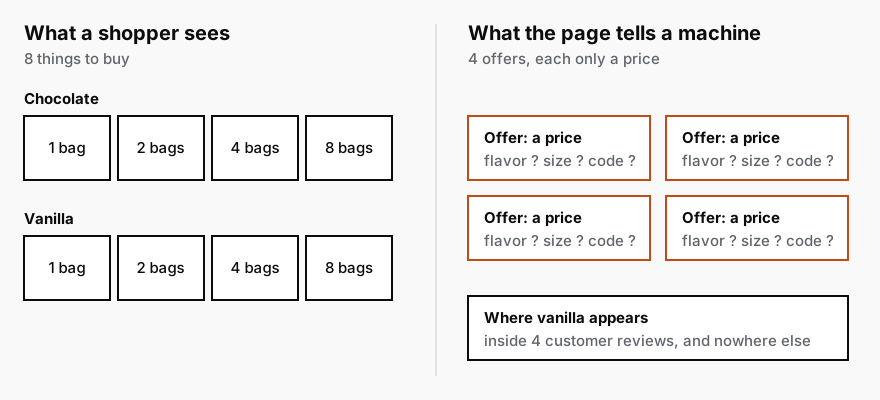
Nothing about this is visible from the front of the site. The page looks right, the reviews are real, the photos load, and anyone who buys gets what they chose. It only matters to the readers who never see the page, which means every search engine and every AI assistant somebody asks about my product. An assistant asked for a vanilla plant protein has to work out from four reviews that I sell one. Google, putting together a shopping result, gets four prices it cannot attach to anything.
If most of your sales go through retailers, this is still your week, just a smaller part of it. When a buyer or a shopper asks an assistant whether your product is gluten free, or what sizes it comes in, it answers from whatever it can read, and your own site is usually part of that, whoever sells the product. The barcode is the number that tells a machine the product on your page is the same one on the Kroger or Amazon listing, and a site that never states it leaves that connection to guesswork.
The part underneath every page
Three weeks ago I wrote about the two readers of a product page, and the ingredient panel that reaches the machine as a file name because it lives inside a photograph. That was one page and one kind of fact. This week is about the part underneath every page, which the trade calls technical SEO: whether search engines and AI assistants can read your site properly, as opposed to what the site says.
In the older days finding problems there went one of two ways. You paid an agency for an audit, waited a couple of weeks, and got back a long document in a language only the agency spoke. Or you ran the website-checking software agencies use and got a report with a few hundred warnings, sorted by category rather than by what they cost you, and you read the first page and closed the tab. Either way, the three problems that mattered were somewhere in the middle of the pile, next to forty that did not, and telling them apart was the expensive part.
Have AI read it for you
Today you give Claude a prompt and it does the reading and the sorting. A prompt is just the instructions you type in, and you can paste this one as it is into Claude or ChatGPT, with your own web address where the brackets are. Both can open web pages; if it answers that it cannot, look in its settings for a switch called web search and turn it on. If you would rather not do this yourself, forward the prompt to whoever looks after your website. The check itself is a paste, though what it finds may still need a developer's time.
I run a food and drink brand, and I want to know what my website tells search engines and AI assistants, as opposed to what it shows people. My site is [your web address].

Before anything else, tell me whether you can see each page's hidden code, the part a visitor never sees. If you cannot, say so and stop, and I will paste that code under this message.

Look at four pages: my home page, one page that lists several of my products if I have one, my best-selling product, and one blog post. For each, tell me:

1. Whether search engines and AI assistants are allowed to read it at all, or whether a setting, an age check or a pop-up gets in their way.
2. Whether the same product can be reached at more than one web address, and if so, whether the page tells search engines which address is the real one.
3. What the hidden product description says. This is a block of code on a product page, written for machines rather than people, that lists what you sell, the price, whether it is in stock, and the product codes. Does it list every flavor and size I actually sell, each with its own product code, and a barcode number wherever that item has one?
4. Which facts a shopper would need, like ingredients or nutrition, exist only inside a picture.
5. What happens when someone visits an old product address of mine that Google still lists.

Only tell me what you actually saw. A page can carry words like "Sold out" that only show under certain conditions, so do not report anything like that as a fact unless the page's own product information says so. If you could not check something, say so rather than guess.

Then give me no more than ten problems, the ones costing me sales first. For each one, show me the page and the exact thing you found, say whether it costs sales or is only tidiness, and say who fixes it: me in my store settings, a web developer, or the company behind one of my apps. Finish with a short list of things I should ignore.
The question at the top is there because I ran this on my own store the way you would, in an ordinary chat with web search on, and it could not see the hidden code at all. Its browsing reads a page as text and throws that code away. It also nearly told me my product was sold out, from a "Sold out" label that the page carries and only shows when stock runs out. If it says it cannot see the code, this takes about twenty seconds:
- Open your product page in Chrome.
- Press Command, Option and U together (Control and U on Windows). A screen full of code opens.
- Select all of it, copy it, and paste it under the instructions.
Of everything in that prompt, the line asking it to admit what it could not check is the one I would never remove.
One template behind every product page
The problems it finds share one property that changes how you fix them. Your product pages are not built one at a time. Each one is the same template filled in with different words and photos, so a gap in the template is a gap on every product you sell, and fixing pages one by one never ends.
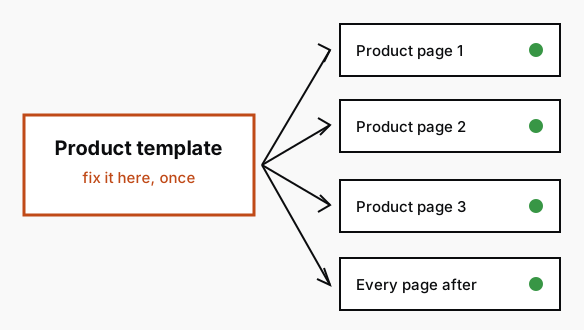
So the second prompt takes one problem at a time and asks for the fix at the template, written so you can hand it straight on:
Here is one problem from a check of my website: [paste one problem from the first answer, with what was found]. My online store runs on [the software your store runs on, such as Shopify].

Write me the fix. Make it the smallest change that fixes the problem on every page where it happens, not one page at a time. If it is a setting in my store, tell me exactly where to click. If it needs code, write the code, say which file it goes in and what it replaces, and write it up as a short note I can forward to my developer. If it needs information I have, like barcode numbers, tell me which items should have one and which should not, and give me a spreadsheet layout I can fill in and upload in one go.

Do not suggest anything that hides my pages from search, changes a page's web address without sending the old address to the new one, touches my checkout, or makes a health or nutrition claim my label does not make.

Finish with how to confirm it worked, using a free tool, and what I should expect to see.
Everything it is told not to do is a real way to make a site worse while fixing it. One wrong setting can take a site out of Google entirely. A changed web address with nothing pointing from the old one throws away every link anybody ever made to the page. Checkout is on the list because nothing here is worth risking the page where people pay. The health claim is specific to food and supplements: the hidden block is still a public statement about your product, and a claim in it that your label does not make is the same claim anywhere else.
What came back for my store
For my four prices, what came back was a note for whoever edits the site, with the exact code to change in the product template, and a short job in the store admin that takes the barcode numbers in one go. It also told me which of my pack sizes need a barcode of their own and which do not, and pointed me at a free checker from Google, called the Rich Results Test, with what the page should show there once the change was made.
The change went in the same day. The template edit was one block of code, and the barcodes were already sitting in a folder, the way barcodes usually are. Afterwards the Rich Results Test showed eight items where there had been four, each with its own flavor, size and product code, and vanilla became something my page sells rather than something my customers mention.
Then I ran the first prompt again, which is the part I would not skip. The fix is finished when the check stops finding the problem, and the second run also tells you whether anything else moved while somebody was in there. Google says a change like this can take anywhere from a few days to a few weeks to be picked up, and neither Google nor the assistants will ever tell you what they could not see on your site, which is the whole reason to have something read it for you.
The full guide
What AI actually does inside a CPG operation, and what it costsThe three kinds of work worth pointing AI at, what each one costs to build, and the work I will tell you to leave alone at your size.
CPG AI Assessment
Fix the CPG workflow that keeps landing back on your desk.
I map the recurring reporting or operating workflow first, then build only when the first useful fix is clear.