By Smári Ásmundsson · · 6 min read
AI agents dashboard: what a CPG founder should see each morning
What should an AI agents dashboard show a CPG founder?
Your distributor report is not in your inbox at 6:10 in the morning, and nothing told you it was missing. You find out at 9:30, when someone asks where a number came from.
One screen should prevent that, with one row for each job that runs on a schedule. Each row shows when the job last ran, what proof it left behind, and one of three states: OK, Fixed, or You decide. Red is for the rows only you can decide. A morning with no red rows takes a few seconds to read.
Which fields turn a job log into a dashboard a founder can read in a minute?
That screen is an AI agents dashboard: a status page for the AI helpers that each own one repeating job, like pulling a distributor report or checking reorders. It is built from the job log, which is the list your systems write every time scheduled work runs: a time, a job name, and a line saying what happened. Nobody has to read it, so nobody does. Raw, it runs to hundreds of lines.
Four fields cut it down to a minute:
- Job, in the words you would say out loud. "Distributor sales pull", not a file name.
- Last ran, in Pacific time, with the date if it was not today.
- Proof, which is what the job was supposed to leave behind.
- State: OK, Fixed, or You decide.
A fifth item appears only on red rows: one line saying what happened and what your two options are. Everything else stays off the first screen.
What counts as proof that a job did its work?
Proof is something you can point at: a file that is new today, a row count that is not zero, an email draft sitting in the drafts folder, a number that moved. A job that says "finished" has told you about itself. A job that shows its output has told you about the work.
I wrote about a content system that passed every check it had and still produced content nobody wanted to read. Every check asked whether the machinery ran. None asked whether the output was any good. A dashboard built on "finished" repeats that mistake on a nicer screen, so the rule is simple: if the log shows no output, the row says "no proof" and goes red.
Which failures should reach the founder, and which should the AI fix?
Sort by what the fix would touch. If the fix is a retry of the same job, a late file arriving, or a re-run with the same settings, the AI handles it and the row says Fixed with a note on what it did. Fixed rows stay on the screen, so nothing is repaired out of sight. If the fix touches money, a message to a customer, a rule you set, or a failure that a retry did not clear, the row says You decide.
That split is the same idea as the AI that audits the AI: a standard set once and applied every time, with a person owning the threshold. You do not read every row. You own the line between Fixed and You decide, and you move it when it is wrong.
An example morning, with illustrative numbers: twenty jobs ran overnight. Seventeen are OK and say nothing. Two failed and were fixed by a later run. One needs you.
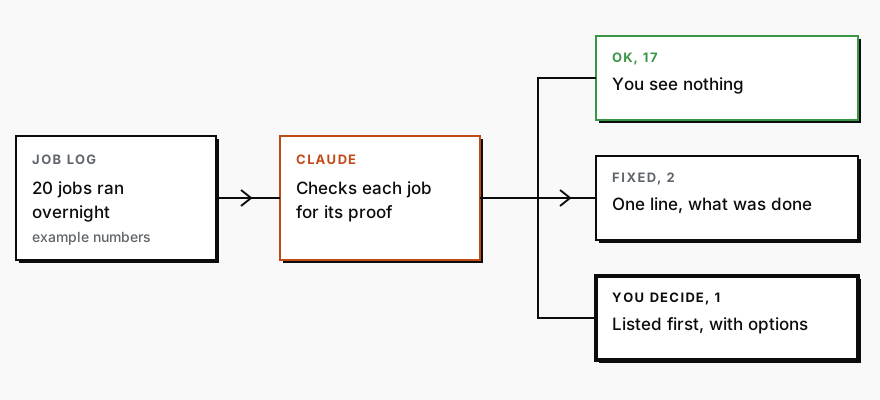
The old way, and the one block that replaces it
In the older days you would open each tool's run history, scroll to find when each job last ran, open the file or record it should have produced, check that it was new, and type the result into a spreadsheet. For twenty jobs, call it two hours, every morning you wanted to be sure. So most mornings you did not check, and the stale report found you instead.
Today, give Claude, an AI chat assistant, your job log and the instructions below, and the screen comes back in about thirty seconds. Those instructions are what people call a prompt: plain-English directions you type or paste. You paste them as printed.
What comes back looks like this, with the red row first:
| Job | Last ran | Proof | State |
|---|---|---|---|
| Distributor sales pull | Today 4:02 AM | No file today | You decide |
| Reorder check | Today 5:30 AM | 14 rows | OK |
| Email drafts | Today 5:45 AM | 3 drafts waiting | OK |
| Amazon report | Today 4:40 AM (retried) | File, 2,180 rows | Fixed |
Under the table, the red row gets one line: the distributor portal returned an empty file twice, and your options are to wait for tomorrow's file or ask the distributor for a resend.
Whoever manages your operations pastes the log, and your part is reading the screen. Most tools that run things on a schedule, such as the tool that sends your email or builds your reports, have a run history or activity page. Copy the list from there. A distributor portal will not have one, but whatever fetches from it will. If a job leaves no log, ask whoever built it to add one line per run: the time, the job name and what it produced. If nothing in your business runs on a schedule yet, there is no log to paste, and the first step is one repeating job, like the weekly distributor pull. Add the screen once two or three are running.
Below is the record my systems wrote while running scheduled work. Each line is one run of one job: a time, a job name, and what it reported. Turn it into a one-screen status page for a busy founder.

Use one row per job, named the way a person would say it, with four columns: Job, Last ran (Pacific time, with the date if it was not today), Proof, State.

Proof is what the job was supposed to leave behind: a file, a row count, a draft, a number. Quote it from the record. If the record only says the job finished and shows nothing it produced, write "no proof" and mark the state You decide.

State has three values. OK: it ran on time and the proof is there. Fixed: it failed or ran late, but a later run in the record produced the proof; say which run. You decide: anything involving money, a message to a customer, or a change to a rule, or a failure that no later run cleared.

Put the You decide rows first. Under the table, add one line for each of them saying what happened and what my two options are. If nothing needs me, say so in one sentence above the table. If a time or a number is missing from the record, write "missing" instead of filling it in.

Here is the record:
How often should the dashboard check itself?
Once a day, before you are up, is a sensible start. A job that has to run every hour gets checked every hour, but you only see it if it turns red, because an hourly alert you cannot answer within the hour only adds noise.
The dashboard also needs a check on itself. Put the time it was built at the top of the screen. If that time is older than a day, the whole screen is stale and says so, because a dashboard that stopped updating looks exactly like a quiet night.
Pasting the log each morning is fine to start. If you would rather have this readout waiting when you open it, with nobody pasting anything, that is what the Reporting Sprint is for. The founder's CPG dashboard covers what belongs on the numbers side of the same screen.
Services
Reporting SprintNobody spends their week building the report. You open it and see what is working, what is leaking, and where to push next.
CPG AI Assessment
Fix the CPG workflow that keeps landing back on your desk.
I map the recurring reporting or operating workflow first, then build only when the first useful fix is clear.