By Smári Ásmundsson · · 8 min read
AI chat for ecommerce: what a CPG brand should let it answer
Is ai chat for ecommerce worth adding to a CPG brand's store, and what should it be allowed to answer?
A shopper types into your store chat at 9 PM: "Is this safe with my son's tree nut allergy?" The chat answers in one friendly sentence, and nobody on your team sees it until the shopper's reply comes back as a complaint. An AI chat is worth adding to a CPG store when it answers one kind of question, the kind a sentence on your own pages already answers, and hands everything else to a named person by email. It is not worth adding as an open "ask us anything" box, because one wrong answer about an allergen, a refund or a health claim costs more than the hours the chat saves.
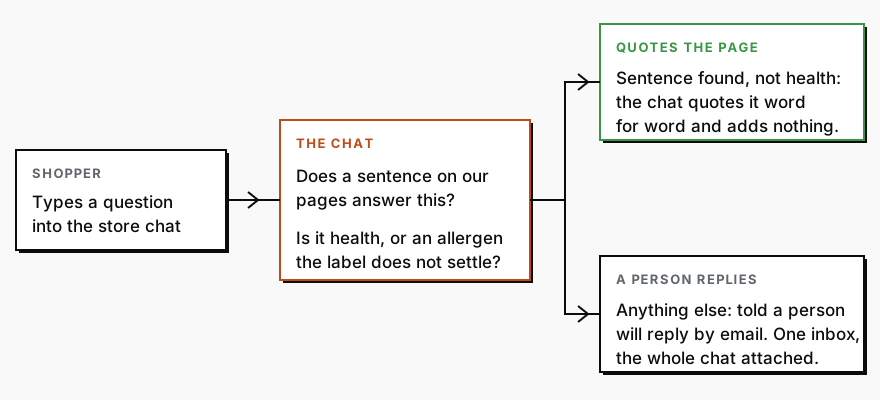
Which customer questions can a chat answer from the product page alone?
The ones where the answer is a sentence you already published and the chat only has to find it. The ingredient list as printed. Flavors and sizes. How to prepare the product. The shipping window and the return window as your policy pages state them. Whether something is in stock, if the chat reads your store's own stock status rather than guessing.
Use one test on every answer: which sentence on our pages says this? If the chat cannot point to one, it should not answer. For ingredients and allergens it should quote the label word for word and stop. A line copied straight from your pack, such as "contains oats", is an answer. "Yes, that should be fine for nut allergies" is advice, and advice belongs to a person.
Which questions should always go to a person?
Five kinds, and the chat's instructions should name each one:
- Anything about health: pregnancy, medication, a condition, a child.
- Any allergen question the label does not settle outright, including cross-contact.
- A refund, credit or replacement beyond what your written policy grants.
- Wholesale terms, pricing exceptions and press.
- Any shopper who sounds angry, or who says something went wrong after eating.
A handoff, meaning the moment the chat passes the shopper to a person, has to do something. The shopper is told a person will reply by email, the chat asks for an email address and an order number, and the whole conversation lands in one inbox with the chat attached. A handoff that ends in "please contact support" is a dead end, and it is the fifth failure below.
This is the same sort we use for every ecommerce job you might hand to AI: anything that moves money or could hurt a customer belongs to a person, and the AI drafts at most.
How does the chat learn your policies without inventing them?
It does not learn them. You give it one answer sheet, a single document listing the questions it may answer and the sentence that answers each, and it answers only from the sheet. A chat told to "be helpful about shipping" fills the gaps with what shipping usually looks like at other stores. A chat given your actual shipping page, and told to answer only from that page and to say a person will follow up when the page is silent, has nothing to fill.
The answer sheet is the list of allowed questions from the section above, each with the sentence that answers it. When a policy changes, you change the sheet that day and the chat changes with it. The rules for the chat belong on the same page as your other rules for AI, which the one-page AI playbook covers. If your team already answers the same questions by email, support replies that learn shows how to turn the replies they send into answers AI can reuse, and the same material feeds the sheet.
Five ways a store chat goes wrong for a food brand
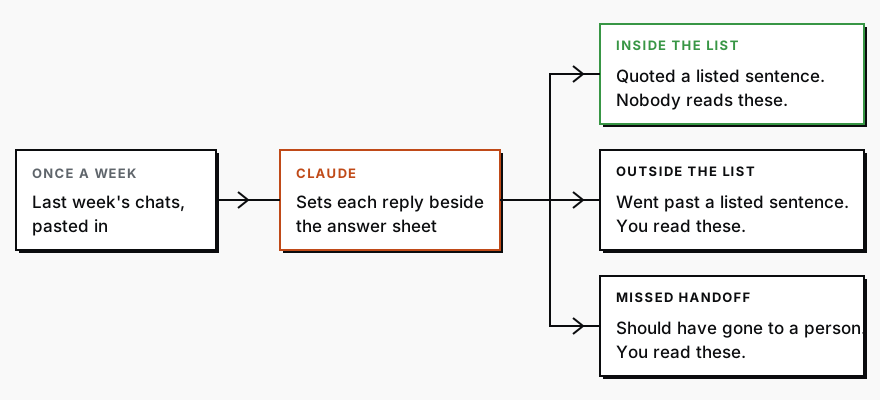
Each one has a guardrail, which is a rule the chat cannot break, and a weekly check that would have caught the failure. The check is work an AI assistant called Claude does on last week's chats, not work you do.
| What goes wrong | The guardrail | What Claude checks each week |
|---|---|---|
| It invents an ingredient or allergen answer. | The chat quotes the label word for word and never answers an allergen question the label does not settle. | Finds every ingredient, allergen and "safe for" question and sets each reply beside the label. |
| It promises a refund your policy does not allow. | The chat may state the written refund policy. It never offers a refund, credit or replacement itself. | Finds every reply that offers money, a credit or a free replacement and sets it beside the policy. |
| It quotes a stale shipping window. | The chat reads your shipping page as it stands today, never a copy pasted in last spring, so the page is the one place a window changes. | Sets every shipping window the chat quoted beside the page as it reads today and lists the ones that differ. |
| It answers a health question as advice. | Every health question is handed off, with a fixed line that says a person will reply. | Finds chats with a health word in them and flags any reply that is not a handoff. |
| It never hands off. | Every chat that cannot answer ends with the email handoff and names who receives it. | Finds chats where the shopper asked twice, or asked for a person, and the chat kept going. |
The third row fails quietly. The chat was right on the day you set it up, then a shipping window changed on the page or in your head, and nothing told the chat. Nobody made a mistake, and a shopper still got a promise you cannot keep. That is why the check runs weekly rather than at launch.
One case where all of this is the wrong first step: if most of the questions you get come from buyers and distributors rather than shoppers, they arrive by email and your store chat will barely be used. Start with the email. The answer sheet still helps there, because it is the list of what your team answers from memory today.
How does a founder check what the chat actually said last week?
In the older days you would export the week's chats, read each one beside your product pages and policies, mark every answer that went past what the pages say, and write up the misses for whoever runs the chat. Four hours later you would have your answer for one week, which is why a check like this is easy to put off.
Today Claude does both halves of that job: a one-time setup, then a short weekly check. Step one happens once, and whoever answers your support email does it: they open a new chat in Claude (a chat window like ChatGPT's), paste the block below, then paste your product pages, your shipping and returns policy, and a few months of customer emails underneath it. You read what comes back.
Here is what comes back, for a made-up brand, Harbor Oat Co. The questions and answers are illustrative, not real data.
| Group | Question | Where the answer comes from |
|---|---|---|
| Chat may answer | Does it contain oats? | The ingredient line on the product page, quoted. |
| Chat may answer | When will my order arrive? | The shipping page, quoted. |
| Chat may answer | Can I return an open bag? | The returns page, quoted. |
| Always a person | Can my toddler eat this? | Health. A person replies. |
| Always a person | Is anything made near sesame? | The label is silent on it. A person replies. |
| Always a person | Can I get a refund after the return window? | Outside the written policy. A person replies. |
| Needs an owner decision | Do you ship to Canada? | Neither page says. The owner decides and the answer goes on the sheet. |
Underneath the table it writes the instructions for the chat itself, in plain sentences, ready to paste into whatever chat tool your store uses. Here is what to paste. A prompt is just the instructions you type in, and you can paste this one as it is.
We are a food and beverage brand deciding what our website chat may answer. Below this message I will paste our product pages, our shipping and returns policy, and a few months of customer emails. Use only what I paste. Do not add any fact that is not in it, and if a fact is missing, say what is missing.

Write four things.

1. A list of the questions the chat may answer. Next to each, quote the exact sentence from our pages or policy that answers it. If no sentence answers it, it does not go on this list.

2. A list of the questions that always go to a person, with a one-line reason for each. Put every question about allergies, health, pregnancy, medication or children here, every refund, credit or replacement outside our written policy, wholesale terms, and any customer who sounds upset.

3. Every question in the customer emails that neither list covers, under the heading "Needs an owner decision".

4. One short paragraph of instructions for the chat, in plain sentences. It must say that the chat answers only from list 1, quotes the page word for word on ingredients and allergens, and for anything else tells the customer a person will reply by email and asks for their email address and order number.
Read the third group first. Those are the questions your own customers ask that your pages never answered, and each one is a decision only you can make. Answer them once and they stop being a gap.
Then the weekly check. The same person asks whoever runs your store chat for last week's conversations as plain text, pastes them into the same Claude conversation and types: review every chat against the list above, show me each reply that went beyond a listed sentence, and each chat that should have gone to a person and did not. You read the short list that comes back.
If you want a store chat scoped for your brand before anything gets built, that is work for the CPG AI Assessment.
CPG AI Assessment
Fix the CPG workflow that keeps landing back on your desk.
I map the recurring reporting or operating workflow first, then build only when the first useful fix is clear.