By Smári Ásmundsson · · 5 min read
AI retail analytics: what it can tell a CPG brand, and five conclusions it should not draw
What can ai retail analytics tell a CPG brand, and which conclusions should it never draw from them?
You tell a buyer a store's sales have dropped, and the buyer tells you the shelf was empty all week.
AI reading your retailer's store sales report can tell you what sold, where, and how that compares with the weeks before. It cannot tell you why. On its own it can also draw five conclusions that are wrong often enough to check before any number reaches a buyer meeting.
What AI can tell you from a store sales report
It can count and compare the rows the file contains. Which stores sold the item last week, how each store compares with its own recent weeks, which stores stopped selling, which started. Those are questions the rows settle, and I covered what to have AI report each week in a separate note.
The report shows what happened and never which cause was behind it. So every sentence that begins "because" is a conclusion that needs a check, and a person asks the buyer for the cause.
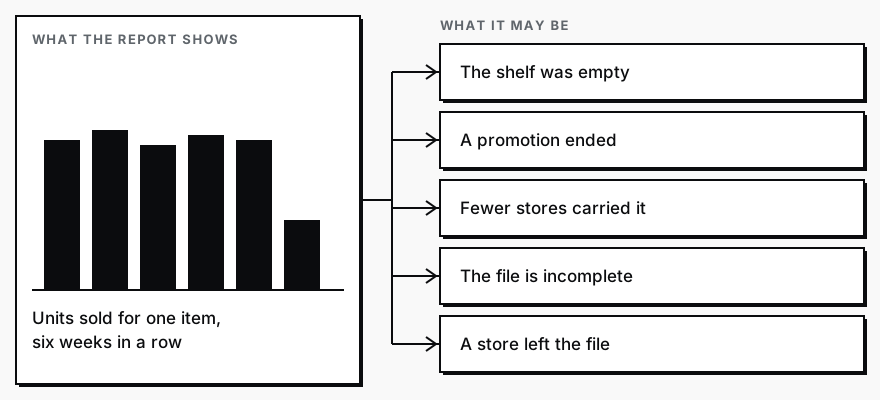
Five wrong conclusions, and the check that catches each
A stock-out read as weak demand. Sales in a store fall to nothing and AI says shoppers lost interest. The shelf may have been empty, and an empty shelf sells nothing whatever the shoppers wanted. The check is the stock count for that store and week. If the portal offers one, AI should use it. If it does not, the right answer is "demand cannot be concluded", and the question for the buyer is whether the item was on the shelf.
A promotion read as a trend. A promotion week can sell more, and the weeks after can sell less. AI can read the rise as growth and the fall as decline. The check is the promotion calendar. Compare promotion weeks with promotion weeks and ordinary weeks with ordinary weeks, and never read a trend across the boundary.
A store count change read as velocity. Velocity here means units per store per week. If more stores start carrying the item, total units rise and the pace per store may not move at all. If stores drop it, the reverse. The check is to show the number of stores selling next to every total, and to compare the pace per store.
A late file read as a drop. The newest week in a portal file can be incomplete because the data has not all arrived. AI sees a low last week and calls it a drop. The check is to say which week is the newest and may be partial, and to leave it out of any comparison until the next file confirms it.
A missing store read as zero. A store that appears in some weeks and not others may have sold nothing, or it may be missing from the report. AI can treat absence as zero, because the sum still works. The check is to list those stores as missing, never as zero, and to ask the retailer before counting them.
None of these five needs a number to understand, which is why they survive. Each reads as an ordinary result until someone asks about the shelf, the calendar, the store list or the date. If you are weighing a paid platform instead, the same five checks apply to whatever it reports, and I wrote about how a brand chooses one.
Make AI check itself before the buyer meeting
In the older days you would take the report and, for every sentence you planned to say to a buyer, go back to the rows. You would check how many stores were in each week, whether the newest week was complete, whether a promotion ran, which stores dropped out of the file. That is most of an afternoon before each meeting, and it is the first thing skipped when the week is full.
Today, give Claude (Anthropic's AI assistant) the report and the instructions below, and you have the checked version in a few minutes. The instructions are what people call a prompt, which is just the words you type in. Paste this one as it is.
What comes back is a short table. Each row is one conclusion AI drew, the stores and weeks it rests on, which of the five traps applies, and whether it stands, does not stand or cannot be concluded from this file. Where a conclusion cannot stand, it gives you the question to put to the buyer. It is the same idea I wrote about in the AI that audits the AI: the second pass has the job of saying no.
I am attaching this week's store sales report from a retailer for our item. First, list every conclusion you would draw from it about how the item is selling, one per line. Then check each conclusion against five traps and mark it STANDS, DOES NOT STAND or CANNOT CONCLUDE. Trap 1: a store with low or zero sales may have had an empty shelf, so if the file has no stock count for that store and week, say demand cannot be concluded. Trap 2: a promotion week is not a trend, so if I have not told you the promotion weeks, ask before comparing across them. Trap 3: if the number of stores selling changed, compare units per store per week and show the store count beside every total. Trap 4: the newest week may be incomplete, so exclude it from every comparison and say so. Trap 5: a store missing from some weeks is missing, not zero, so list those stores and do not count them. For every conclusion, show the stores and weeks it rests on. For every one that does not stand or cannot be concluded, write one question I should ask the buyer.Whoever pulls your retailer reports pastes this in with the file attached. Your part is reading the table and taking the questions to the buyer.
Run it on the day each new file arrives. A run that happens monthly finds a stock-out a month after the buyer did.
If you would rather have your whole weekly readout built and waiting, that is what the Reporting Sprint at Nordic Navigators does.
Services
Reporting SprintNobody spends their week building the report. You open it and see what is working, what is leaking, and where to push next.
CPG AI Assessment
Fix the CPG workflow that keeps landing back on your desk.
I map the recurring reporting or operating workflow first, then build only when the first useful fix is clear.