By Smári Ásmundsson · · 7 min read
Cash Flow Forecast Excel Template a CPG Founder Can Fill With AI
Is there a cash flow forecast Excel template a CPG founder can fill with AI?
A production deposit, a retailer who pays late and a payroll week can land in the same fortnight, and a monthly sheet shows none of it until the money has gone. A thirteen-week sheet shows it weeks ahead. You do not need to download a template for this. You need a sheet with the right rows, and an AI assistant can fill it from two files you already have: your bank transactions and the list of invoices, bills and purchase orders you have not settled yet. Whoever keeps your books (you, if you keep them yourself) downloads the two files and pastes in the instructions below. Your part is reading the answer, which is a table that tells you which weeks run short and by how much.
Which rows does a CPG cash forecast need that a generic template lacks?
A generic template has income, expenses and a balance. A CPG brand needs four more things.
An inventory buys row, kept apart from supplier payments. A production run is often paid in two lumps, a deposit when you commit and a balance when it ships. Those lumps tend to be the biggest single payments you make, and a template that files them under "expenses" buries them in a total.
A receipts row built on when customers actually pay, not on the date the invoice says. Retailers and distributors often pay late, and some pay less than the invoice and keep the difference as a deduction. Online store and marketplace payouts land on the payout schedule, not on the day of the sale.
A payroll and fixed costs row that follows its own calendar: payroll every other week, rent once a month, software scattered through it.
A floor row. The floor is the balance you never want to drop below, because below it you cannot cover the next payroll and the next production deposit. You choose the number. The sheet compares every week's closing balance with it and shows the gap.
Put the weeks across the top, thirteen of them, which is one quarter.
How does AI fill the sheet from exports without retyping?
An export is a spreadsheet file you download from your bank or accounting software. You already have the two that matter.
In the older days you would open the bank file and the list of open invoices and bills, then move each line into a week by hand. This invoice is due on the 12th, but this retailer usually pays ten days late, so it goes in the week after. With forty open items across thirteen weeks, that is four hours. And next week you do it again.
Today, whoever keeps your books attaches the two files to a chat with Claude, Anthropic's AI assistant, and pastes one set of instructions. Claude fills the sheet while you do something else. What you read is which week drops under your floor. This is what comes back, with invented numbers, for the first six weeks, in dollars.
| | Wk 1 | Wk 2 | Wk 3 | Wk 4 | Wk 5 | Wk 6 |
|---|---|---|---|---|---|---|
| Opening balance | 62,000 | 63,000 | 68,000 | 45,000 | 47,000 | 23,000 |
| Receipts | 18,000 | 15,000 | 14,000 | 12,000 | 13,000 | 20,000 |
| Supplier payments | 9,000 | 6,000 | 7,000 | 6,000 | 5,000 | 6,000 |
| Inventory buys | 0 | 0 | 22,000 | 0 | 24,000 | 0 |
| Payroll and fixed costs | 8,000 | 4,000 | 8,000 | 4,000 | 8,000 | 4,000 |
| Closing balance | 63,000 | 68,000 | 45,000 | 47,000 | 23,000 | 33,000 |
| Floor | 40,000 | 40,000 | 40,000 | 40,000 | 40,000 | 40,000 |
| Over or under the floor | +23,000 | +28,000 | +5,000 | +7,000 | -17,000 | -7,000 |
Weeks 5 and 6 are under the floor. Week 5 carries the 24,000 balance due on a production run, and week 6 is still short by 7,000 even after a large retailer pays. You now have four weeks to ask the supplier for a later date, split the payment, or chase the retailer. Without the sheet you would meet that number in week 5.
The instructions below produce that table. Paste them as they are, change the 40,000 to your own floor, and attach the two files. (An instruction written to an AI like this is called a prompt.)
I am attaching two files. File one is a bank transactions export covering at least the most recent quarter. File two lists everything still open: invoices customers owe me, bills I owe suppliers, and purchase orders with the dates payment is due.

Build a 13-week cash flow forecast as a table, weeks across the top, starting with the current week. Use exactly these rows: Opening balance, Receipts, Supplier payments, Inventory buys, Payroll and fixed costs, Closing balance, Floor, Over or under the floor.

Rules:
1. The first opening balance is the latest balance in file one. Each later opening balance is the previous week's closing balance.
2. Receipts: put each open customer invoice in the week it is due. If file one shows that customer has paid late before, move it to the week it will probably land, using that customer's own average delay. If that customer has paid less than the invoice before, count the lower amount.
3. Supplier payments: the bills in file two, in the week each is due.
4. Inventory buys: the purchase orders and production deposits in file two, in the week payment is due.
5. Payroll and fixed costs: repeat the pattern file one shows for payroll, rent, software and loan payments.
6. The floor is 40,000 dollars in every week.
7. If you cannot tell which week an item belongs in, leave it out of the table and list it separately. Do not guess.

After the table, list every week where the closing balance is under the floor and by how much. Then list every assumption you made. Then show, for each week, that opening balance plus receipts minus all payments equals the closing balance.
Next week, the same person pastes the new bank file into the same chat and asks for the forecast again. The instructions stay the same and only the files change.
When does a weekly forecast beat a monthly one?
When one payment can take you under the floor. In the sheet above, a monthly view with the month ending after week 4 shows 47,000 and no problem. The dip to 23,000 arrives the week after.
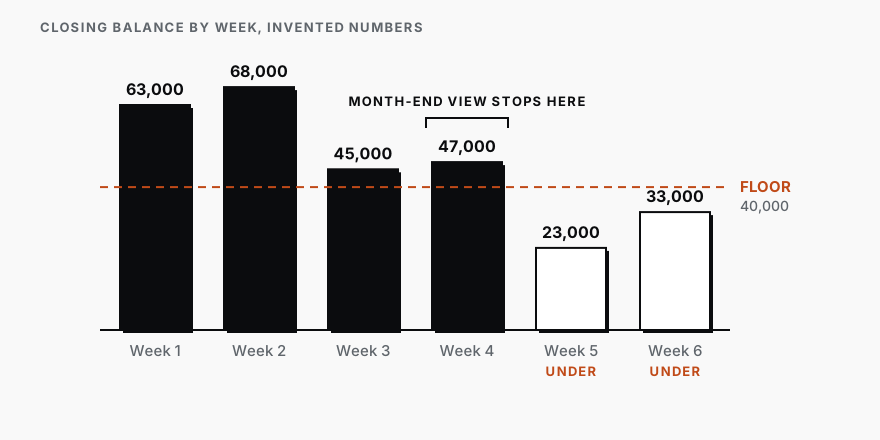
A monthly forecast is enough when no single payment you make is larger than the gap between your balance and your floor. If your lumps are small and your balance sits well above the floor, thirteen weeks of rows is more upkeep than it earns.
How do you check the AI's forecast against the bank balance?
Test it on a period that has already happened. In the same chat, ask Claude to run the forecast again as if today were four weeks ago, using only what was known then. Your bank file shows what actually cleared since, so Claude can compare. Ask it to put each week's forecast balance next to the real one and to name the biggest payment behind each gap.
A gap of a few thousand dollars that traces to one retailer who paid a week later than average is fine. The sheet works on your own history. A gap with no payment behind it means a kind of payment is missing from your files. Add the file that holds it and run the check again.
Treat the result as a draft. A person approves a forecast before anyone acts on it, and nothing here moves money. Can AI handle receivables, bills due and cash flow forecasts? sets out which finance tasks AI does alone and which a person signs off. The inventory buys row is easier to fill once you know which products to reorder, and how to use AI for inventory management in a CPG brand shows how. The habit of two files in and one checked table out is the same one behind the weekly check on which of your automated marketing emails to fix first.
If you want this running every week without anyone pasting files, that is the Reporting Sprint, a fixed piece of work where I set up one weekly readout of your numbers.
Services
Reporting SprintNobody spends their week building the report. You open it and see what is working, what is leaking, and where to push next.
CPG AI Assessment
Fix the CPG workflow that keeps landing back on your desk.
I map the recurring reporting or operating workflow first, then build only when the first useful fix is clear.